
PIQSY Picks
Best tablets for what you actually need: PIQSY Buy US picks
There isn't one universally best tablet. If you mostly watch shows and read, look at the iPad A16, Galaxy Tab A11+, or compact Alexa Tablet 8 depending on your apps. If you handwrite notes, Samsung's Galaxy Tab S10 Lite gives you an included S Pen, while the iPad Air M4 suits Apple Pencil Pro workflows. For large Android multitasking, compare the OnePlus Pad 3 and Galaxy Tab S12+ at the same verified US 12GB/256GB configuration. Other jobs need different devices.
The decision this shortlist answers
Quick answer: There isn't one universally best tablet.
Some shopping links may pay PIQSY a commission if you make a qualifying purchase. Editorial assessments remain independent. Affiliate disclosure
Product shortlist
Products covered in this guide.
Browse the products covered in this guide. The order does not indicate a ranking.
In this guide
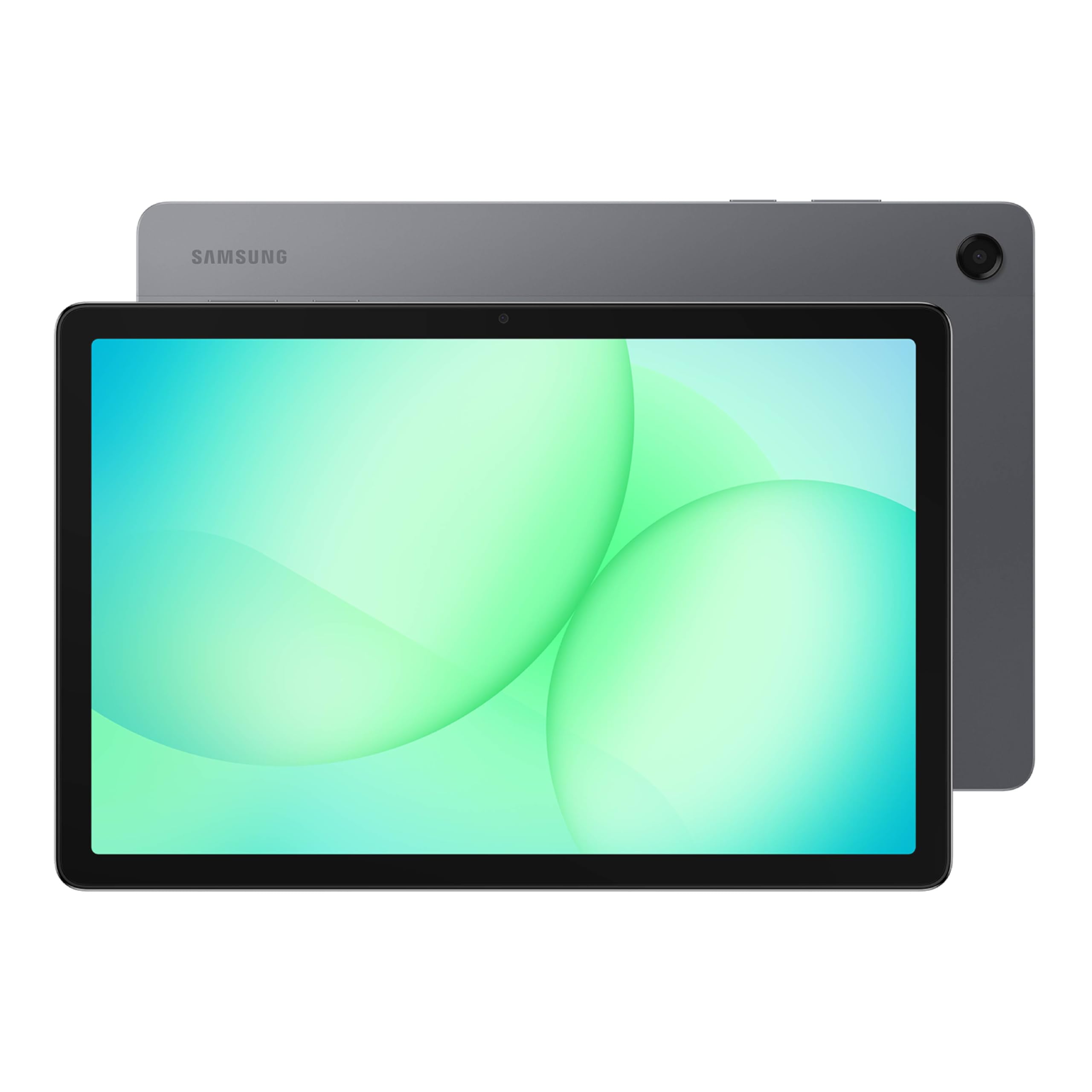
Galaxy Tab A11+
US model: Galaxy Tab A11+ Gray
Amazon.com · Checked Nov 3, 2026
Everyday video and browsing; a shared household tablet; someone who wants a Samsung device without paying for flagship extras.
Trade-off: Entry-level memory and display hardware, and no S Pen path for notes or drawing.
In this guide

iPad 11-inch (A16)
US model: iPad 11 A16
Amazon.com · Checked Nov 3, 2026
Everyday iPad apps; family browsing and homework; someone who wants the Apple ecosystem without paying for a high-end chip.
Trade-off: Its pen and keyboard choices are more limited than those of an iPad Air, and accessories increase the real cost.
Paid link · PIQSY may earn a commission
In this guide
Amazon Alexa Tablet 8
US model: Amazon Alexa Tablet 8 Graphite
Casual reading and streaming; a compact home control screen; people already using Amazon entertainment and Alexa services.
Trade-off: 4GB of RAM and a small screen limit its appeal for demanding multitasking.
Paid link · PIQSY may earn a commission
In this guide
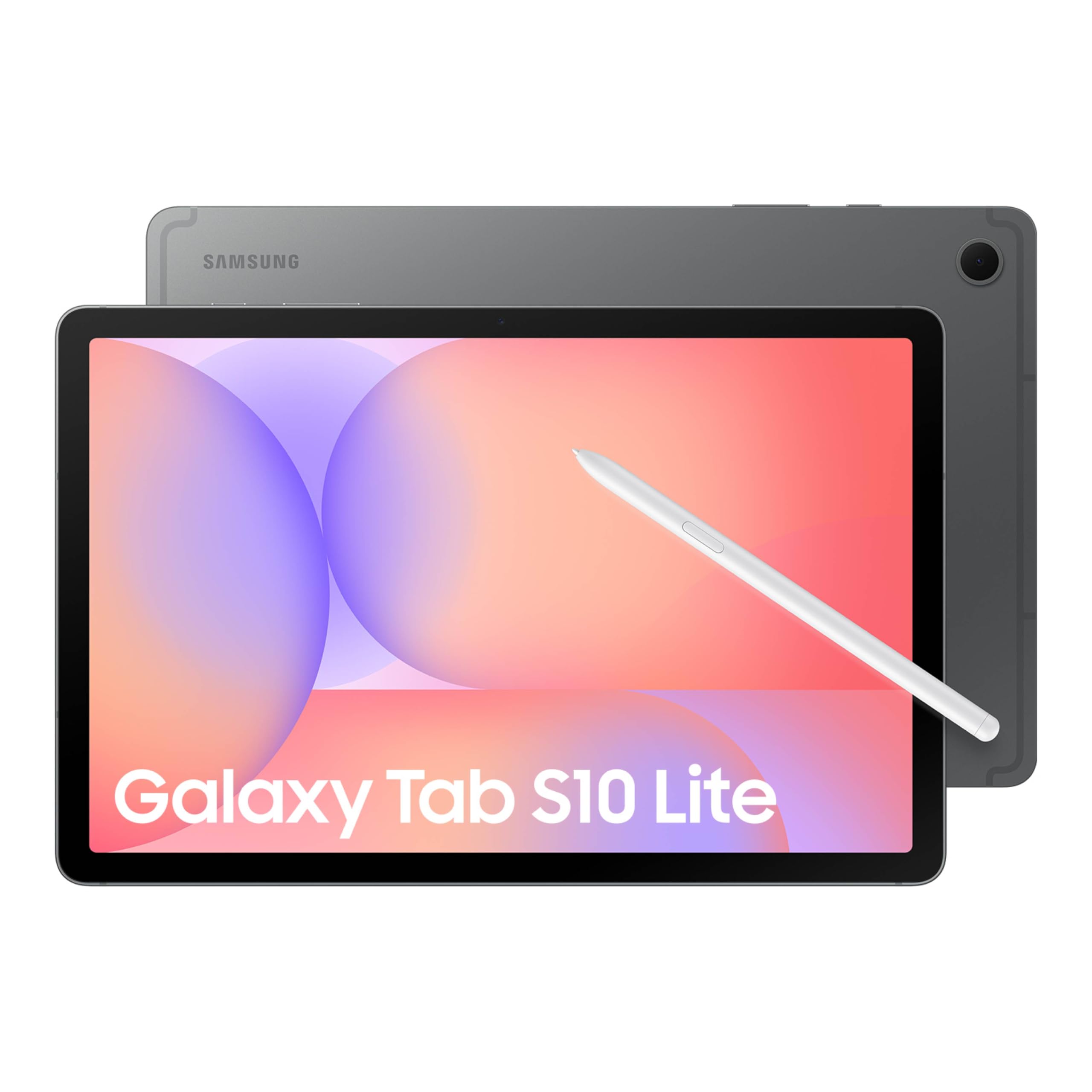
Galaxy Tab S10 Lite
US model: Galaxy Tab S10 Lite Coral Red
Amazon.com · Checked Nov 3, 2026
Students who annotate class material; journalers and occasional artists; Android users who want a pen without a separate pen purchase.
Trade-off: You're choosing a practical midrange tablet, not Samsung's most powerful display or processor tier.
Paid link · PIQSY may earn a commission
In this guide

Galaxy Tab S10 FE
US model: Galaxy Tab S10 FE Blue
Amazon.com · Checked Nov 3, 2026
Students annotating class notes; people who mark up PDFs; Android shoppers who want an included pen and manageable 10.9-inch size.
Trade-off: Its practical LCD-class screen and middle-tier hardware are not the same as Samsung's premium AMOLED models.
Paid link · PIQSY may earn a commission
In this guide

iPad Air 11-inch (M4)
US model: 11-inch iPad Air M4
Amazon.com · Checked Nov 3, 2026
Students who handwrite notes regularly; illustrators who need Apple Pencil Pro compatibility; people who want a capable iPad without the larger Pro format.
Trade-off: Premium input accessories cost extra, while the display is still an LCD rather than a Pro OLED.
Paid link · PIQSY may earn a commission
In this guide
iPad mini (A20 Pro)
US model: iPad mini A20 Pro Midnight standard glass
Frequent travelers and commuters who read or annotate; people taking notes while standing; anyone who wants iPad apps in a smaller device.
Trade-off: Small-screen multitasking and the added cost of accessories make it less versatile at a desk than a bigger iPad.
In this guide
Legion Tab Gen 5 (8.8-inch Snapdragon)
US model: Lenovo Legion Tab Gen 5
Android gamers who carry a tablet; people who favor compact high-refresh displays; buyers comparing a small gaming tablet with a large phone.
Trade-off: The compact screen limits document work, and display refresh rate alone doesn't establish game frame rates.
In this guide
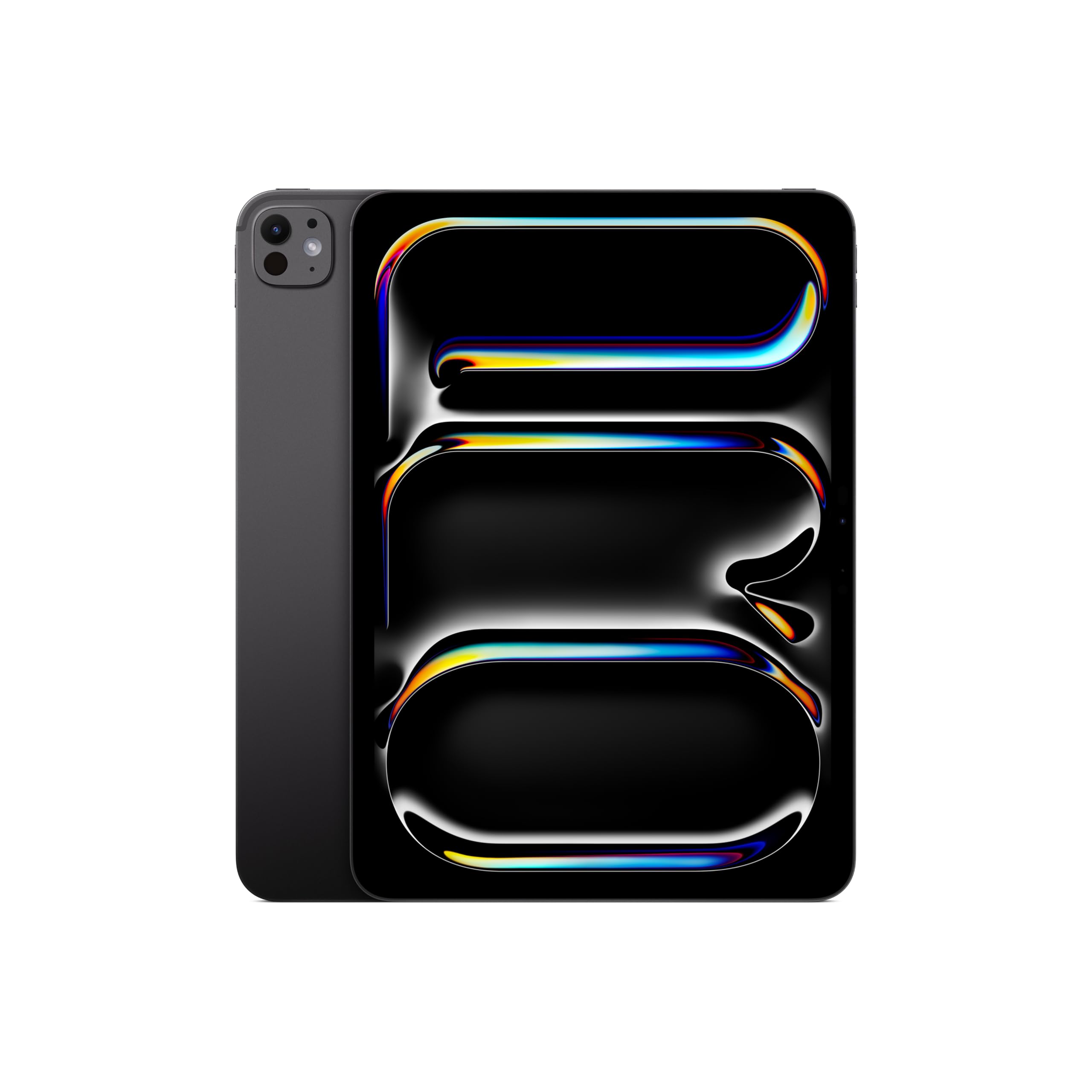
iPad Pro 11-inch (M5)
US model: iPad Pro 11-inch M5 standard glass
Amazon.com · Checked Nov 3, 2026
Visual creators who prioritize the display; experienced iPad artists who value Pencil Pro; mobile professionals whose primary apps truly work on iPadOS.
Trade-off: The premium price buys capabilities that many everyday iPad users will barely use, and accessories cost extra.
Paid link · PIQSY may earn a commission
In this guide
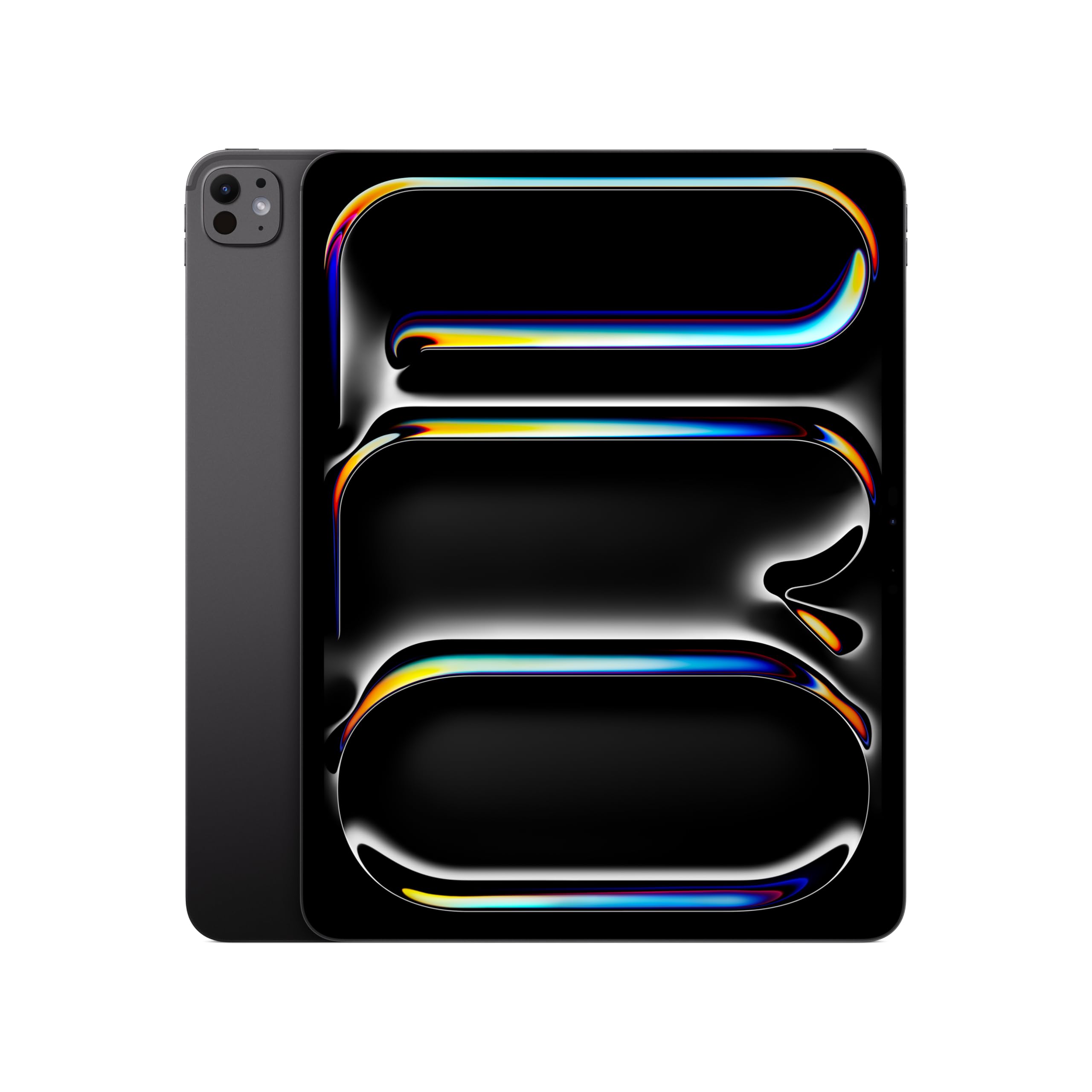
iPad Pro 13-inch (M5)
US model: iPad Pro 13-inch M5 standard glass
Amazon.com · Checked Nov 3, 2026
Illustrators who need room for tools and artwork; visual professionals who care about display quality; desk-based iPad users with demanding supported applications.
Trade-off: An expensive, desk-oriented package whose Pencil and keyboard add further to the total.
Paid link · PIQSY may earn a commission
In this guide
Galaxy Tab S12 Ultra
US model: Galaxy Tab S12 Ultra Gray
Illustrators using supported Android apps; desk-based note-takers and document reviewers; buyers specifically wanting a 14.6-inch Samsung display.
Trade-off: A large tablet can be inconvenient in tight spaces, and its keyboard is a separate purchase.
In this guide
Lenovo Yoga Tab Plus Gen 2
US model: Lenovo Yoga Tab Plus Gen 2
Illustrators and annotators who want screen room; people reviewing high-resolution images; Android users seeking a larger desk-oriented tablet.
Trade-off: Accessory packaging and exact US RAM need a final part-specific check before comparing value.
In this guide

Galaxy Tab S12+
US model: Galaxy Tab S12+ Gray
Amazon.com · Checked Nov 3, 2026
Students and professionals who handwrite frequently; people who split documents across a larger screen; Samsung users choosing between premium tablet sizes.
Trade-off: The purchase can get expensive once a compatible keyboard and other accessories are added.
Paid link · PIQSY may earn a commission
In this guide

Pad 3
US model: OnePlus Pad 3 Storm Blue
Amazon.com · Checked Nov 3, 2026
Android users who work with several documents; people who want a spacious media tablet; OnePlus phone owners interested in the brand's connected features.
Trade-off: It's a large device, and the compatible pen and keyboard are separate purchase decisions.
Paid link · PIQSY may earn a commission
In this guide
Lenovo Tab Plus Gen 2
US model: Lenovo Tab Plus Gen 2
People who watch shows on a countertop or desk; listeners who use a tablet as a portable speaker; households wanting hands-free media without a separate stand.
Trade-off: A speaker-focused tablet can be bulkier and less balanced for handheld reading than a plain slate.
In this guide
Amazon Alexa Tablet 11
US model: Amazon Alexa Tablet 11 Graphite
Households using Alexa and Amazon services; students doing light reading and research; people who want an 11-inch streaming tablet.
Trade-off: Alexa-specific features may be irrelevant unless your home and services fit the ecosystem.
Paid link · PIQSY may earn a commission
In this guide
Amazon Kids Tablet 8.7-inch
US model: Amazon Kids Tablet 8 age 6+ bundle
In this guide
Amazon Kids Tablet 11-inch
US model: Amazon Kids Tablet 11 age 6+ bundle
In this guide

Samsung Galaxy Tab A11+ Kids Edition
US model: Galaxy Tab A11+ Kids Blue
Amazon.com · Checked Nov 3, 2026
In this guide
REDMAGIC Astra 2
US model: REDMAGIC Astra 2
Mobile gamers who want OLED; buyers comfortable with gaming-specific Android settings; people who value a compact play-first device.
Trade-off: Specialist gaming hardware is less compelling for general tablet work, and exact purchase accessories and stock require checking.
In this guide
Motorola moto pad (2026)
US model: Motorola moto pad (2026), T-Mobile
T-Mobile customers who use tablets away from Wi-Fi; students who need mobile data; people who want simple Android browsing and video on the move.
Trade-off: Carrier eligibility and ongoing service costs can outweigh the convenience of the modem.
In this guide
Surface Pro 12-inch (12th Edition)
US model: Surface Pro 12-inch (2nd Edition)
People whose everyday work is compatible with Windows on Arm; mobile students and professionals who want touch plus a keyboard option; travelers who value compact Windows flexibility.
Trade-off: The keyboard, pen and wall charger can add to the cost, and some Windows software needs compatibility checking.
In this guide
Surface Pro 13-inch (12th Edition)
US model: Surface Pro 13-inch (12th Edition) LCD Snapdragon X2 Plus
Windows users who want touchscreen flexibility; students who need compatible desktop software; travelers who alternate between touch and long keyboard sessions.
Trade-off: A keyboard and pen are separate, and Windows on Arm requires more application homework than an ordinary tablet purchase.
Quick answer: There isn't one universally best tablet. If you mostly watch shows and read, look at the iPad A16, Galaxy Tab A11+, or compact Alexa Tablet 8 depending on your apps. If you handwrite notes, Samsung's Galaxy Tab S10 Lite gives you an included S Pen, while the iPad Air M4 suits Apple Pencil Pro workflows. For large Android multitasking, compare the OnePlus Pad 3 and Galaxy Tab S12+ at the same verified US 12GB/256GB configuration. Other jobs need different devices.
These shortlists start with what you need to do, not a single overall ranking. Each pick has a specific use, a real trade-off and an exact US version to check. Affiliate commissions and popularity don't determine the recommendations.
Everyday value and family browsing
Start with iPad A16 128GB Wi-Fi if your household wants iPadOS apps, web browsing, video, schoolwork and a straightforward 11-inch screen. Its main attraction is delivering the everyday iPad experience without requiring M4 or M5 hardware. Skip it if Apple Pencil Pro or native Windows software is essential; its pen options are different.
Consider Galaxy Tab A11+ Gray 6GB/128GB Wi-Fi, SM-X230NZAIXAR when your apps are on Android and you don't need advanced pen input. Its 11-inch size is convenient for shows and general household use. Skip it if you need the S Pen, because Samsung confirms A11+ is not compatible.
Consider Alexa Tablet 8 Graphite 4GB/128GB, Best Buy SKU 6690888 when compact reading, casual streaming and Amazon/Alexa services matter more than screen room. It is an Android/Google Play-oriented new Alexa model, not a generic old Fire OS tablet. Skip it if you frequently work with multi-window documents or have a demanding app workload.
Decision rule: Check the exact app first, then choose the smallest practical screen and total purchase package. We do not claim these three have a permanent price ranking; US retail offers change.
Students who annotate and handwrite
Start with Samsung Galaxy Tab S10 Lite Coral Red 6GB/128GB Wi-Fi if you want handwriting without a separate pen purchase. Samsung includes the S Pen in the exact US bundle. That's a real benefit for lecture notes, diagrams and PDF markup. Skip it if iPadOS-only school software or heavy creative work is required.
Consider Galaxy Tab S10 FE Blue 8GB/128GB, SM-X520NLBAXAR if you want a different Samsung hardware tier and the extra memory helps your app requirements. It also includes S Pen, so don't pay more merely to unlock handwriting. Skip it when the Lite already handles your tasks and the premium adds nothing you use.
Consider 11-inch iPad Air M4 128GB Wi-Fi for Apple Pencil Pro support and an excellent smaller creative canvas. Its fully laminated display matters most when you use handwriting or drawing regularly. Skip it if Apple apps don't fit, or if you can't justify a separately purchased Pencil and keyboard.
No strong match: The Galaxy Tab A11+ cannot be converted into a compatible S Pen tablet with a separate pen purchase. If school software requires Windows, none of these Android/iPadOS shortlists is automatically suitable.
Portable small tablets for commuting
iPad mini A20 Pro Midnight, 128GB Wi-Fi standard glass is appealing for a genuinely small iPadOS reader with Pencil Pro support. As of October 30, 2026, it is a preorder, with US availability scheduled for November 6. Do not treat it as an already-tested post-launch product or an immediately available pickup.
Alexa Tablet 8 Graphite is a smaller Android alternative for casual reading and Amazon services. It gives you an 8.7-inch screen without committing to a full-size tablet, but its 4GB RAM and compact workspace may limit more demanding multitasking.
Lenovo Legion Tab Gen 5, ZAH20126US, 12GB/256GB serves a different small-device job: Android gaming on an 8.8-inch IPS screen. It's not automatically a better reading tablet simply because it has a powerful chip.
Decision rule: If the device is usually in your hands, size and weight should lead. If you need two full documents at once, none of these compact candidates is an obvious fit.
Creative drawing and premium displays
11-inch iPad Pro M5, 256GB Wi-Fi standard glass makes sense if tandem OLED and ProMotion materially improve your supported creative workflow but you still want a portable canvas. Its selected 256GB variant has the nine-core CPU and 12GB memory—not the 1TB model's different tier.
13-inch iPad Pro M5, 256GB Wi-Fi standard glass serves a buyer who wants that premium display in a bigger workspace for illustration or visual review. Skip it for mainly handheld reading or ordinary document work where the 13-inch Air may suffice.
Galaxy Tab S12 Ultra Gray, SM-X940NZAAXAR, 12GB/256GB is for someone who values a 14.6-inch Android creative canvas and an included S Pen. Skip it if its footprint is too large for your commute or if your required creative app only runs on iPadOS.
Lenovo Yoga Tab Plus Gen 2, ZAHX0159US, 256GB is another large Android creative option to investigate, but its exact US RAM and included pen/keyboard kit remain unverified. It can remain a conditional shortlist, not a recommendation that assumes free accessories.
No strong match: None of these Android/iPadOS products automatically runs a Windows desktop plugin or every specialist design program. Verify the app and export workflow before choosing the hardware.
Large-screen Android entertainment and multitasking
OnePlus Pad 3 US, Storm Blue 12GB/256GB Wi-Fi offers a 13.2-inch screen with a page-friendly shape and Open Canvas multitasking. The US announcement states an 80W charger in the box; Stylo 2 and keyboard are separate purchase decisions. Do not borrow benchmark results from a foreign 16GB/512GB variant.
Galaxy Tab S12+ Gray, SM-X840NZAAXAR, 12GB/256GB Wi-Fi offers a 12.6-inch Samsung workspace with an included S Pen. Choose it when Samsung apps and handwriting matter more than OnePlus's slightly larger display. Both are genuine alternatives for different habits, not a measured battery hierarchy.
Lenovo Tab Plus Gen 2, ZAHT0078US, 128GB offers a rotating kickstand and JBL speaker hardware for media at a desk or counter. Confirm exact US RAM and any accessory inclusions at checkout. Skip it if you will use headphones most of the time and mainly need a small handheld reader.
Alexa Tablet 11 Graphite, 8GB/128GB, SKU 6690890 is a different take on general Android media, emphasizing Alexa-oriented services and an 11-inch screen. Skip it if you don't use those services and prefer a speaker/stand-led setup.
Decision rule: Prefer OnePlus for the larger multitasking canvas, Samsung for the included pen, Lenovo for its physical media setup, or Alexa when the Amazon service environment is the point. Do not invent an audio or endurance test winner.
Family and children's tablets
Amazon Kids Tablet 8 Aquatic, SKU 6690894 makes sense for smaller hands and an 8.7-inch screen. It is an age 6+ bundle with a protective case and a one-year Kids+ subscription, but its 64GB storage may require managing downloads.
Amazon Kids Tablet 11 Aquatic, SKU 6690892 has an 11-inch screen and 8GB RAM with the same selected 64GB storage. Choose it when a bigger learning interface makes a real difference. The initial content subscription is not a lifetime entitlement.
Galaxy Tab A11+ Kids Edition Blue, SM-X230NZAVXAR, 6GB/128GB includes a Kids Edition cover, Crayo-Pen, tether and stickers. The Crayo-Pen is not Samsung's active S Pen, and the A11+ remains not S Pen compatible.
No strong match: None has been independently proven universally safest for children. Parental setup, content rules, school-app compatibility, subscription renewals and supervision remain essential.
Compact Android gaming
Lenovo Legion Tab Gen 5 12GB/256GB is a compact gaming-oriented tablet with an 8.8-inch IPS display up to 165Hz.
REDMAGIC Astra 2 12GB/256GB offers a slightly larger 9.06-inch OLED display up to 185Hz. Check current US selected-variant stock and the wall charger, which is not included in the documented base package.
These are different screen preferences, not a certified gaming performance ranking. We have no comparable same-region sustained frame-rate, thermal or battery test that establishes a universal winner.
No strong match: If your game requires native Windows or a controller mode unavailable on either Android model, don't force a choice. A higher screen refresh ceiling doesn't guarantee your game will reach it.
Cellular travel and always-connected work
Motorola moto pad (2026), T-Mobile 8GB/128GB 5G can make sense for a customer with suitable T-Mobile service, coverage and acceptable ongoing costs. Carrier financing, eligibility and unlocking are part of the purchase decision.
Galaxy Tab A11+ unlocked 5G Gray, SM-X238UZAAXAA, 6GB/128GB is a distinct US cellular model, not the normal Wi-Fi A11+. It can be interesting when carrier choice matters, subject to verifying the exact network and plan compatibility.
No strong match: If you demand unlocked use across every carrier or country without checking coverage, neither listing establishes that guarantee. If you almost always have Wi-Fi, a Wi-Fi tablet and occasional hotspot may cost less.
Native Windows work
Surface Pro 12-inch (2nd Edition), Black Snapdragon X2 Plus six-core, 16GB/256GB is for Windows-on-Arm work when your essential applications and drivers are verified. Its keyboard, pen and wall charger require separate budgeting.
Surface Pro 13-inch (12th Edition), Platinum LCD Snapdragon X2 Plus ten-core, 16GB/256GB gives you a larger Windows-on-Arm touchscreen workspace, with a different charger/bundle proposition. Do not transfer results from a 13-inch OLED/Elite model to this LCD configuration.
No strong match: If your required software, exam platform, corporate VPN or connected device driver is incompatible with Windows on Arm, neither Surface is a proven substitute for a conventional Intel/AMD Windows computer.
How to use these picks
Find the situation that resembles your daily routine. Read the individual product review for the exact generation, storage and trade-offs, then check a head-to-head comparison if two tablets still look close. Confirm US-market model identity, app compatibility, included pen/keyboard/charger, storage, mobile-data plan and current selling terms.
A store's combined star average isn't the same as feedback from verified owners of the exact version. We don't yet have enough individually checked US customer reviews to draw a reliable owner consensus, so we don't rank these tablets by stars. Nor do we claim a battery or speed winner without comparable tests.
PIQSY conclusion
A good tablet is the one that handles your hard requirements without paying for irrelevant extras. For ordinary life, start simple. For frequent handwriting, inspect the pen package. For creative work, check your apps and canvas. For families, look beyond the kid-friendly case. For cellular or Windows use, check the plan or program compatibility first.
There is no shame in choosing none of these when your important job isn't supported. That is better buying advice than forcing one product to win every category.
Before buying: Recheck the exact US model, accessories, ongoing subscriptions, warranty and today's total checkout cost. A shortlist helps narrow the choices; the exact seller package is still worth checking.
Evidence notes — private only
- Frozen T11 US 25-product/15-comparison handoff: data/us/tablets/tablets-t11-effective-manuscript-handoff-2026-10-30.v1.json
- Apple US product families: https://www.apple.com/ipad-air/specs/ ; https://www.apple.com/ipad-pro/specs/ ; https://www.apple.com/ipad-11/specs/
- Samsung A11+ pen: https://www.samsung.com/us/tablets/galaxy-tab-a11-plus/
- OnePlus official US 12/256: https://www.oneplus.com/us/press/press-release/oneplus-launches-its-flagship-android-tablet-oneplus-pad3-in-the-united-states-and-canada
- Family bundle source: https://www.samsung.com/us/tablets/galaxy-tab-a11-plus/buy/galaxy-tab-a11-plus-kids-edition-128gb-blue-wi-fi-sku-sm-x230nzavxar/
Compare the shortlist
Understand the alternatives.
Use the buying advice above for trade-offs. Compare model details here, and open a Verdict where available.
Galaxy Tab A11+
US model: Galaxy Tab A11+ Gray
Everyday video and browsing; a shared household tablet; someone who wants a Samsung device without paying for flagship extras.
Read Verdict →iPad 11-inch (A16)
US model: iPad 11 A16
Everyday iPad apps; family browsing and homework; someone who wants the Apple ecosystem without paying for a high-end chip.
Read Verdict →Amazon Alexa Tablet 8
US model: Amazon Alexa Tablet 8 Graphite
Casual reading and streaming; a compact home control screen; people already using Amazon entertainment and Alexa services.
Read Verdict →Galaxy Tab S10 Lite
US model: Galaxy Tab S10 Lite Coral Red
Students who annotate class material; journalers and occasional artists; Android users who want a pen without a separate pen purchase.
Read Verdict →Galaxy Tab S10 FE
US model: Galaxy Tab S10 FE Blue
Students annotating class notes; people who mark up PDFs; Android shoppers who want an included pen and manageable 10.9-inch size.
Read Verdict →iPad Air 11-inch (M4)
US model: 11-inch iPad Air M4
Students who handwrite notes regularly; illustrators who need Apple Pencil Pro compatibility; people who want a capable iPad without the larger Pro format.
Read Verdict →iPad mini (A20 Pro)
US model: iPad mini A20 Pro Midnight standard glass
Frequent travelers and commuters who read or annotate; people taking notes while standing; anyone who wants iPad apps in a smaller device.
Read Verdict →Legion Tab Gen 5 (8.8-inch Snapdragon)
US model: Lenovo Legion Tab Gen 5
Android gamers who carry a tablet; people who favor compact high-refresh displays; buyers comparing a small gaming tablet with a large phone.
Read Verdict →iPad Pro 11-inch (M5)
US model: iPad Pro 11-inch M5 standard glass
Visual creators who prioritize the display; experienced iPad artists who value Pencil Pro; mobile professionals whose primary apps truly work on iPadOS.
Read Verdict →iPad Pro 13-inch (M5)
US model: iPad Pro 13-inch M5 standard glass
Illustrators who need room for tools and artwork; visual professionals who care about display quality; desk-based iPad users with demanding supported applications.
Read Verdict →Galaxy Tab S12 Ultra
US model: Galaxy Tab S12 Ultra Gray
Illustrators using supported Android apps; desk-based note-takers and document reviewers; buyers specifically wanting a 14.6-inch Samsung display.
Read Verdict →Lenovo Yoga Tab Plus Gen 2
US model: Lenovo Yoga Tab Plus Gen 2
Illustrators and annotators who want screen room; people reviewing high-resolution images; Android users seeking a larger desk-oriented tablet.
Read Verdict →Galaxy Tab S12+
US model: Galaxy Tab S12+ Gray
Students and professionals who handwrite frequently; people who split documents across a larger screen; Samsung users choosing between premium tablet sizes.
Read Verdict →Pad 3
US model: OnePlus Pad 3 Storm Blue
Android users who work with several documents; people who want a spacious media tablet; OnePlus phone owners interested in the brand's connected features.
Read Verdict →Lenovo Tab Plus Gen 2
US model: Lenovo Tab Plus Gen 2
People who watch shows on a countertop or desk; listeners who use a tablet as a portable speaker; households wanting hands-free media without a separate stand.
Read Verdict →Amazon Alexa Tablet 11
US model: Amazon Alexa Tablet 11 Graphite
Households using Alexa and Amazon services; students doing light reading and research; people who want an 11-inch streaming tablet.
Read Verdict →Amazon Kids Tablet 8.7-inch
US model: Amazon Kids Tablet 8 age 6+ bundle
Covered in the Picks guide above
Amazon Kids Tablet 11-inch
US model: Amazon Kids Tablet 11 age 6+ bundle
Covered in the Picks guide above
Samsung Galaxy Tab A11+ Kids Edition
US model: Galaxy Tab A11+ Kids Blue
Covered in the Picks guide above
REDMAGIC Astra 2
US model: REDMAGIC Astra 2
Mobile gamers who want OLED; buyers comfortable with gaming-specific Android settings; people who value a compact play-first device.
Read Verdict →Motorola moto pad (2026)
US model: Motorola moto pad (2026), T-Mobile
T-Mobile customers who use tablets away from Wi-Fi; students who need mobile data; people who want simple Android browsing and video on the move.
Read Verdict →Surface Pro 12-inch (12th Edition)
US model: Surface Pro 12-inch (2nd Edition)
People whose everyday work is compatible with Windows on Arm; mobile students and professionals who want touch plus a keyboard option; travelers who value compact Windows flexibility.
Read Verdict →Surface Pro 13-inch (12th Edition)
US model: Surface Pro 13-inch (12th Edition) LCD Snapdragon X2 Plus
Windows users who want touchscreen flexibility; students who need compatible desktop software; travelers who alternate between touch and long keyboard sessions.
Read Verdict →| Product | US model | Research |
|---|---|---|
| Galaxy Tab A11+ | Galaxy Tab A11+ Gray | Everyday video and browsing; a shared household tablet; someone who wants a Samsung device without paying for flagship extras. Read Verdict → |
| iPad 11-inch (A16) | iPad 11 A16 | Everyday iPad apps; family browsing and homework; someone who wants the Apple ecosystem without paying for a high-end chip. Read Verdict → |
| Amazon Alexa Tablet 8 | Amazon Alexa Tablet 8 Graphite | Casual reading and streaming; a compact home control screen; people already using Amazon entertainment and Alexa services. Read Verdict → |
| Galaxy Tab S10 Lite | Galaxy Tab S10 Lite Coral Red | Students who annotate class material; journalers and occasional artists; Android users who want a pen without a separate pen purchase. Read Verdict → |
| Galaxy Tab S10 FE | Galaxy Tab S10 FE Blue | Students annotating class notes; people who mark up PDFs; Android shoppers who want an included pen and manageable 10.9-inch size. Read Verdict → |
| iPad Air 11-inch (M4) | 11-inch iPad Air M4 | Students who handwrite notes regularly; illustrators who need Apple Pencil Pro compatibility; people who want a capable iPad without the larger Pro format. Read Verdict → |
| iPad mini (A20 Pro) | iPad mini A20 Pro Midnight standard glass | Frequent travelers and commuters who read or annotate; people taking notes while standing; anyone who wants iPad apps in a smaller device. Read Verdict → |
| Legion Tab Gen 5 (8.8-inch Snapdragon) | Lenovo Legion Tab Gen 5 | Android gamers who carry a tablet; people who favor compact high-refresh displays; buyers comparing a small gaming tablet with a large phone. Read Verdict → |
| iPad Pro 11-inch (M5) | iPad Pro 11-inch M5 standard glass | Visual creators who prioritize the display; experienced iPad artists who value Pencil Pro; mobile professionals whose primary apps truly work on iPadOS. Read Verdict → |
| iPad Pro 13-inch (M5) | iPad Pro 13-inch M5 standard glass | Illustrators who need room for tools and artwork; visual professionals who care about display quality; desk-based iPad users with demanding supported applications. Read Verdict → |
| Galaxy Tab S12 Ultra | Galaxy Tab S12 Ultra Gray | Illustrators using supported Android apps; desk-based note-takers and document reviewers; buyers specifically wanting a 14.6-inch Samsung display. Read Verdict → |
| Lenovo Yoga Tab Plus Gen 2 | Lenovo Yoga Tab Plus Gen 2 | Illustrators and annotators who want screen room; people reviewing high-resolution images; Android users seeking a larger desk-oriented tablet. Read Verdict → |
| Galaxy Tab S12+ | Galaxy Tab S12+ Gray | Students and professionals who handwrite frequently; people who split documents across a larger screen; Samsung users choosing between premium tablet sizes. Read Verdict → |
| Pad 3 | OnePlus Pad 3 Storm Blue | Android users who work with several documents; people who want a spacious media tablet; OnePlus phone owners interested in the brand's connected features. Read Verdict → |
| Lenovo Tab Plus Gen 2 | Lenovo Tab Plus Gen 2 | People who watch shows on a countertop or desk; listeners who use a tablet as a portable speaker; households wanting hands-free media without a separate stand. Read Verdict → |
| Amazon Alexa Tablet 11 | Amazon Alexa Tablet 11 Graphite | Households using Alexa and Amazon services; students doing light reading and research; people who want an 11-inch streaming tablet. Read Verdict → |
| Amazon Kids Tablet 8.7-inch | Amazon Kids Tablet 8 age 6+ bundle | Picks guide only |
| Amazon Kids Tablet 11-inch | Amazon Kids Tablet 11 age 6+ bundle | Picks guide only |
| Samsung Galaxy Tab A11+ Kids Edition | Galaxy Tab A11+ Kids Blue | Picks guide only |
| REDMAGIC Astra 2 | REDMAGIC Astra 2 | Mobile gamers who want OLED; buyers comfortable with gaming-specific Android settings; people who value a compact play-first device. Read Verdict → |
| Motorola moto pad (2026) | Motorola moto pad (2026), T-Mobile | T-Mobile customers who use tablets away from Wi-Fi; students who need mobile data; people who want simple Android browsing and video on the move. Read Verdict → |
| Surface Pro 12-inch (12th Edition) | Surface Pro 12-inch (2nd Edition) | People whose everyday work is compatible with Windows on Arm; mobile students and professionals who want touch plus a keyboard option; travelers who value compact Windows flexibility. Read Verdict → |
| Surface Pro 13-inch (12th Edition) | Surface Pro 13-inch (12th Edition) LCD Snapdragon X2 Plus | Windows users who want touchscreen flexibility; students who need compatible desktop software; travelers who alternate between touch and long keyboard sessions. Read Verdict → |
Our research approach
How to interpret the product details.
Our research approach
How to interpret the product details.