
PIQSY verdict
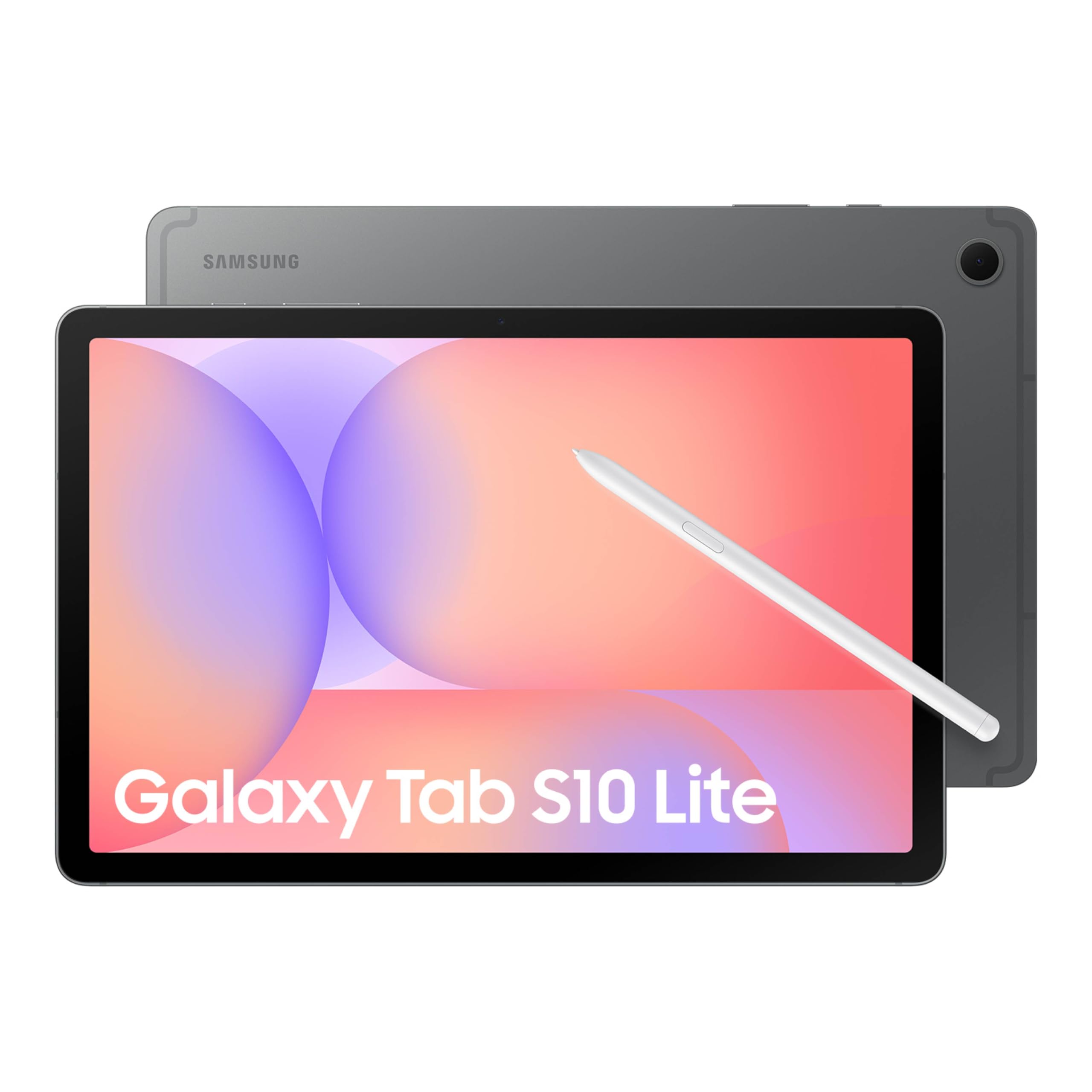
Galaxy Tab S10 Lite
The Samsung Galaxy Tab S10 Lite is especially interesting if you want an Android tablet for classes, PDF notes and casual creative work with an S Pen already in the box. You're choosing a practical midrange tablet, not Samsung's most powerful display or processor tier.
US modelGalaxy Tab S10 Lite Coral Red
Best fit
- Students who annotate class material
- journalers and occasional artists
- Android users who want a pen without a separate pen purchase.
Skip if
- You require iPad-only apps, cellular service or a premium performance tablet for demanding games.
- Casual S Pen artwork
Biggest reason to buy
The in-box S Pen makes the handwriting proposition clear from the outset.
Main compromise
You're choosing a practical midrange tablet, not Samsung's most powerful display or processor tier.
Last checked price
$329.99
Amazon rating
★ 4.6 · 1,365 ratings
Amazon.com snapshot · Nov 3, 2026
Paid link · PIQSY may earn a commission
Some shopping links may pay PIQSY a commission if you make a qualifying purchase. Editorial assessments remain independent. Affiliate disclosure
What matters
Why it earns consideration — and why you might skip it.
Decision snapshot
Choose it for
Students who annotate class material; journalers and occasional artists; Android users who want a pen without a separate pen purchase.
Know before buying
You require iPad-only apps, cellular service or a premium performance tablet for demanding games.
Quick answer: The Samsung Galaxy Tab S10 Lite is especially interesting if you want an Android tablet for classes, PDF notes and casual creative work with an S Pen already in the box. This review uses the exact US Coral Red, 128GB, Wi-Fi configuration. It is a much more specific buy than "a Samsung tablet"—and it makes less sense if handwriting is not on your to-do list.
Best fit: Students who annotate class material; journalers and occasional artists; Android users who want a pen without a separate pen purchase.
Skip it if: You require iPad-only apps, cellular service or a premium performance tablet for demanding games.
Biggest reason to buy: The in-box S Pen makes the handwriting proposition clear from the outset.
Main compromise: You're choosing a practical midrange tablet, not Samsung's most powerful display or processor tier.
Who it fits
Imagine opening a PDF, circling the complicated part of a diagram and writing a question in the margin. That's a much better reason to consider the S10 Lite than an abstract debate about processor rankings. Samsung's US package includes the S Pen, so the core workflow doesn't begin with a second shopping trip.
This is a good fit for someone moving between class readings, handwritten notes, video calls and entertainment. The 10.9-inch screen has enough room for many documents while remaining a tablet you can move around without rearranging your desk. If your handwriting work uses detailed drawings or two large documents next to one another, a bigger display could be more comfortable. A screen's usefulness is about the page in front of you, not only its diagonal.
The selected configuration is Wi-Fi, not a carrier-connected tablet. That distinction matters when you envision it taking notes at a park, on a long commute or in a classroom with unreliable service. You can prepare offline material or use an appropriate connection, but do not assume an included cellular plan.
Coral Red is a finish choice. It doesn't make the pen more responsive or the chip quicker. We would not pay a performance premium just for the color, although finding a tablet you like opening every day is a perfectly respectable reason to prefer it.
What changes the decision
The included S Pen changes the basket price
Samsung's official US product page lists the tablet, S Pen, USB-C cable and ejection pin in the box. That is a straightforward advantage for a buyer whose first priority is handwriting. You can use the pen for annotating notes and compatible creative tools without separately choosing a Pencil tier.
Compare it with the Galaxy Tab A11+ only after asking whether pen input is essential. The A11+ may suit a video and browser household, but it is not an equivalent S Pen handwriting option. The price difference buys a different way of working, not merely another line on the specification sheet.
Compared with an entry iPad, inspect the actual supported Pencil and the cost of adding it. The right answer isn't always whichever tablet has the lower initial sticker price. Look at what you will hold in your hand on day one.
The display is for work and entertainment, not a prestige contest
Samsung identifies a 10.9-inch display on the exact US Coral Red 128GB option. It's a comfortable general-purpose size for reading, watching a video and marking up study material. The brand also promotes Vision Booster, but what matters to you is whether your most common room or commute is easy on the eyes.
Don't read a display feature name as proof that this beats an OLED flagship outdoors, or that every app looks better. Lighting, the content and your own preferences will affect that experience. If screen quality is the reason you're spending significantly more, compare live display examples and verified panel specifications.
For handwritten coursework, a predictable pen and screen combination may do more for productivity than extreme resolution. For a color-critical design job, however, move to a tablet with the precise display and application capabilities you need.
Memory and storage call for a real usage check
The selected US model has 128GB of storage. It provides room for apps and downloaded course material, but downloaded games, videos and creative projects can eat through space. Before opting for this version, look at what your current phone or tablet actually stores.
Samsung also lists a 256GB version, but that is a different retail configuration with its own price. If you plan to collect large offline video libraries or maintain several expansive games, don't assume cloud storage solves it. Local apps still require local space.
As with any tablet, advertised multitasking features are not proof that a specific demanding program will run perfectly. Ask whether your essential Android apps support your intended pen, file and export workflow. That's the test worth doing.
Android app choice can be the deciding feature
For someone already comfortable with Samsung phones and Android apps, the S10 Lite may be easy to integrate into daily routines. If you rely on iMessage-specific workflows, Apple's creative apps or another iPadOS-only program, the S Pen in the box cannot compensate for the missing software.
Similarly, a keyboard case may help with typing without turning this Android tablet into a Windows laptop. School portals, online exams, work security policies and professional software should be checked before assuming any tablet can replace a computer.
Don't turn battery estimates into a race
Samsung promotes long entertainment battery life for the S10 Lite, but manufacturer test claims aren't an independent head-to-head endurance result. Your screen brightness, apps, Wi-Fi conditions and habits affect actual time away from a charger. Check the terms attached to any quoted hour estimate, then choose based on what you will do between charging opportunities.
If battery runtime will make or break your purchase, find a test using a comparable method and exact variant before declaring the S10 Lite better or worse than a competitor. This article does not invent that comparison.
Owner views
Owner feedback still developing
Owner feedback is still developing, so PIQSY is not presenting a consensus yet.
Who should choose something else
Buy the Galaxy Tab A11+ if you just need a straightforward Samsung tablet for media, browsing and light family tasks and you don't plan to write with an S Pen. There's little reason to pay for a pen-first use case you will ignore.
Compare the Galaxy Tab S10 FE if you need a different hardware tier, more memory in its verified configuration or stronger features for a specific application. The S10 Lite 128GB and FE 128GB do not have identical RAM; confirm which software and task actually benefit rather than labeling either universally faster.
Consider an iPad when an important app only works well on iPadOS or when your existing Apple workflow is the point of the purchase. Add the correct compatible Pencil cost before deciding which bundle is better value.
PIQSY conclusion
The Galaxy Tab S10 Lite has a simple appeal: you can start taking handwritten notes without learning a complicated accessory shopping map. For a student or casual creator, that clarity is useful. The 10.9-inch form and Android app selection make it a credible daily tablet, provided Wi-Fi and the 128GB storage tier fit.
We'd recommend it to buyers who will actually use the S Pen several days a week. We'd skip it for buyers who want only a video screen, need demanding gaming performance or require an iPad-only app.
Before buying: Confirm Samsung part SM-X400NZRAXAR (Coral Red, 128GB Wi-Fi), the included S Pen, required applications, total cost of any keyboard, and retailer-specific warranty or return terms. Keep other colors and storage tiers separate at checkout.
Technical detail
Specifications
See full specifications
| Product | Galaxy Tab S10 Lite |
|---|---|
| US model | Galaxy Tab S10 Lite Coral Red |
| Brand | Samsung |
| Model Name | S10 Lite |
| Memory Storage Capacity | 128 GB |
| Screen Size | 10.9 inches |
| Display Resolution Maximum | 2112 x 1320 pixels |
| Generation | 10th Generation |
| Model Year | 2025 |
| Age Range Description | Adult |
| Included Components | Data Cable, Ejection Pin, Quick Start Guide, S-Pen, Tab S10 Lite |
| Warranty Description | 2 Year Manufacturer |
| Model Number | SM-X400NZANXAR |
| Specific Uses For Product | Entertainment, Kids, Student |
| UPC | 198957233845 |
| Number of Items | 1 |
| Style Name | S10 Lite |
| Manufacturer | SAMSUNG |
| Set Name | Galaxy Tab S10 Lite |
| Item Highlight | Long Battery Life, S Pen for Note-Taking, Exynos 1380, Circle to Search, AI Tools |
| Configuration | 6GB RAM, 128GB Storage |
| Unit Count | 1 Count |
| Size | 128 GB |
| Model Series | Galaxy Tab S10 Lite |
| Mfr Part Number | SM-X400NZANXAR |
| Battery Capacity | 8000 milliamp_hours |
| Battery Cell Type | Lithium Polymer |
| Battery Power | 8000 milliamp_hours |
| Lithium-Battery Energy Content | 29.95 watt-hours |
| Processor Speed | 2.4 GHz |
| Processor Description | Exynos 1380 |
| Processor Brand | Samsung |
| CPU Model Number | MediaTek Dimensity 9400+ | MT6991 |
| Other Special Features of the Product | Stylus Support |
| Operating System | Android |
| Color | Gray |
| Video Processor | ARM |
| Item Weight | 1.2 pounds |
| Item Dimensions L x W x Thickness | 6.53"L x 10.01"W x 0.26"Th |
| Human-Interface Input | Touchscreen with Stylus Support |
| Graphics Description | Integrated |
| Compatible Devices | Stylus |
| Warranty Type | Limited |
| Operating System Family | Android |
| Software Update Supported to Date | unknown |
| Display Type | LCD |
| Native Resolution | 2112 x 1320 pixels |
| Aspect Ratio | 16:9 |
| Display Refresh Rate in Hertz | 90 |
| RAM Memory Installed | 6 GB |
| Flash Memory Supported Size Maximum | 2000 GB |
| Compatible Flash Memory Type | microSD |
| RAM Size | 6 GB |
| Hard-Drive Size | 256 GB |
| Hardware Interface | USB |
| Wireless Technology | Wi-Fi |
| Connectivity Technology | Wi-Fi |
| Wireless Compability | 802.11ac, 802.11ax, 802.11g, 802.11n |
| Video Capture Resolution | FHD 1080p |
| Camera Description | Rear |
| Rear Facing Camera Photo Sensor Resolution | 8 mp |
| GTIN | 198957233845 |
Amazon.com technical listing observed Nov 3, 2026. Confirm exact configuration with the manufacturer.
Final decision
Ready to choose, or want one more check?
Buying options
Check the current offer.
Amazon.com · Checked Nov 3, 2026
Paid link · PIQSY may earn a commission
Our research approach
How to interpret the product details.
Our research approach
How to interpret the product details.