
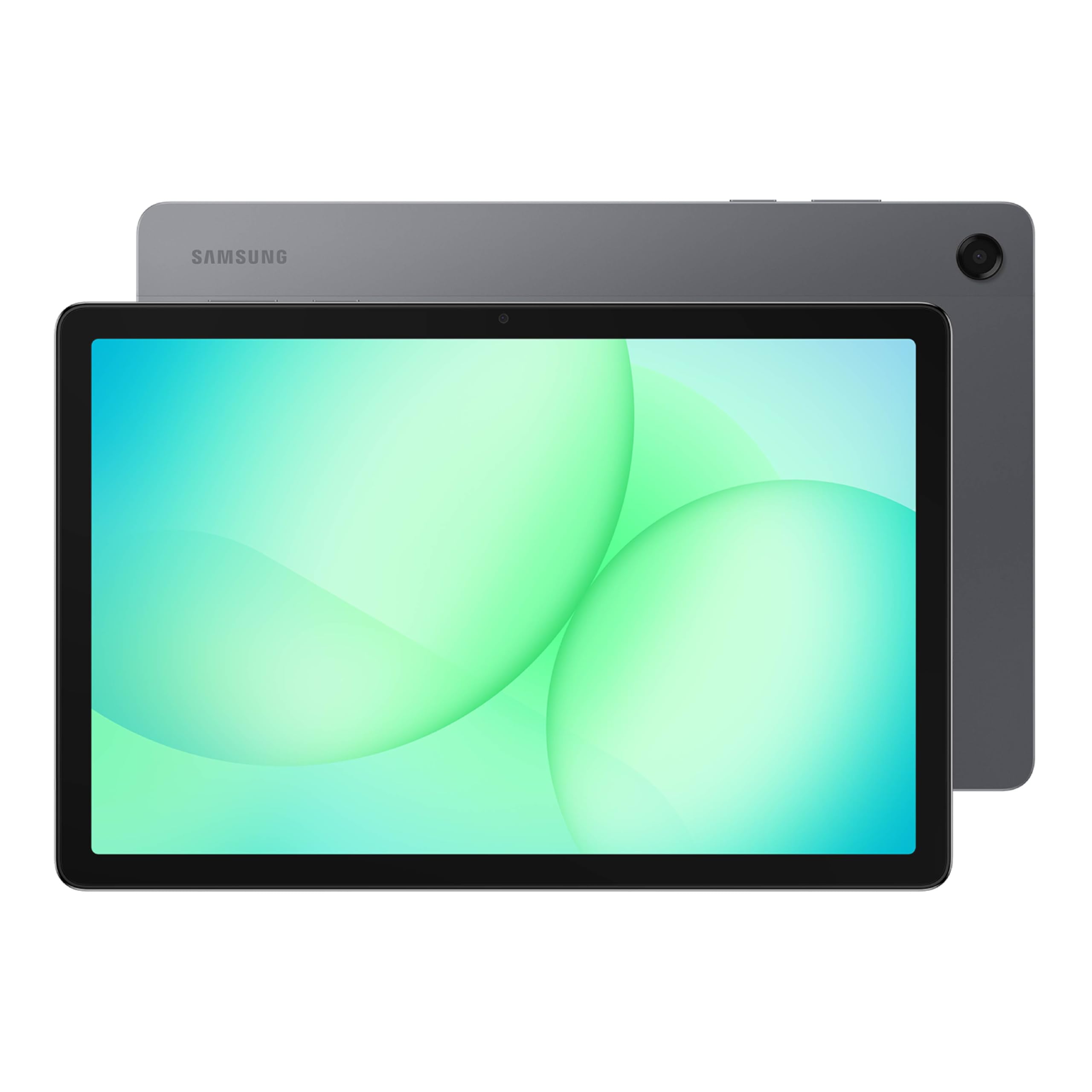
PIQSY verdict
Galaxy Tab A11+
The Galaxy Tab A11+ is an approachable 11-inch Android tablet for streaming, browsing, family use and basic study tasks. Entry-level memory and display hardware, and no S Pen path for notes or drawing.
US modelGalaxy Tab A11+ Gray
Best fit
- Everyday video and browsing
- a shared household tablet
- someone who wants a Samsung device without paying for flagship extras.
Skip if
- You need S Pen writing, demanding creative apps
- cellular data away from Wi-Fi.
Biggest reason to buy
A practical 11-inch Android experience without premium features you may not use.
Main compromise
Entry-level memory and display hardware, and no S Pen path for notes or drawing.
Last checked price
Not verified
Amazon rating
★ 4.3 · 200 ratings
Amazon.com snapshot · Nov 3, 2026
Some shopping links may pay PIQSY a commission if you make a qualifying purchase. Editorial assessments remain independent. Affiliate disclosure
What matters
Why it earns consideration — and why you might skip it.
Decision snapshot
Choose it for
Everyday video and browsing; a shared household tablet; someone who wants a Samsung device without paying for flagship extras.
Know before buying
You need S Pen writing, demanding creative apps, or cellular data away from Wi-Fi.
Quick answer: The Galaxy Tab A11+ is an approachable 11-inch Android tablet for streaming, browsing, family use and basic study tasks. The specific US device here is Gray, 6GB RAM, 128GB storage, Wi-Fi, Samsung part SM-X230NZAIXAR. Its biggest buying trap is simple: it is not compatible with Samsung's S Pen. If handwriting is why you're shopping, start somewhere else.
Best fit: Everyday video and browsing; a shared household tablet; someone who wants a Samsung device without paying for flagship extras.
Skip it if: You need S Pen writing, demanding creative apps, or cellular data away from Wi-Fi.
Biggest reason to buy: A practical 11-inch Android experience without premium features you may not use.
Main compromise: Entry-level memory and display hardware, and no S Pen path for notes or drawing.
Who it fits
The A11+ works best when the job is unglamorous—and that's a good thing. You want to read the news, cook from a recipe, join a video call or play a few casual games. You might place the tablet on the coffee table for the family to use, or take it on a trip for entertainment. You don't need a creative workstation to do any of that.
Samsung's official US listing fixes the identity to 6GB RAM and 128GB storage in Gray with Wi-Fi. Those details are worth checking because the A11+ also comes in other storage and memory configurations, and Samsung sells a separate 5G version. A deal on a similarly named device isn't necessarily an identical product.
An 11-inch screen is a comfortable step above a phone for watching shows, reading web pages and doing light homework. It is still relatively easy to place on a stand or hold in your lap. For serious editing of two large documents, however, screen area isn't the only issue; keyboard comfort and app capability become more important.
The appeal for a Samsung phone household is familiarity with Android and Samsung's services. But this is not a good purchase merely because a badge says Samsung. Confirm that the exact apps your family needs run correctly on Android and that the accounts and parental controls are appropriate.
What changes the decision
The S Pen limitation is the most important fact
Samsung's own US product comparison explicitly says the Galaxy Tab A11+ is not S Pen compatible. That is a hard no for students who want to handwrite lectures using Samsung's active stylus or for artists who plan to sketch with that input system.
If you only sign the occasional form, a basic touch interaction or another workflow may suffice. But don't buy the A11+ thinking you can add a proper Samsung S Pen later. A compatible Galaxy Tab S10 Lite includes an S Pen in its US package and changes the buying proposition for real note-taking.
A11+ shoppers often get more useful value from a sturdy stand, case or Bluetooth keyboard than from seeking a pen it does not support.
An 11-inch screen works well for media, with realistic expectations
Samsung describes an 11-inch TFT LCD display. That should give you plenty of room for video, recipes, websites and colorful apps compared with a phone. The important trade-off is that it is not the Dynamic AMOLED 2X panel of a Galaxy Tab S11.
Would you notice the difference? If you watch movies in a dark room and care deeply about contrast, you might. If the tablet mostly plays cooking videos at a kitchen counter, probably not enough to justify flagship money on that feature alone.
Be careful with display claims that look like test results. We can identify panel types from official sources; that does not establish independently measured brightness, color precision or outdoor readability for this particular unit.
Six gigabytes of RAM is a configuration fact, not a promise
This version has 6GB of RAM, not the 8GB found on Samsung's larger-storage variant. It is reasonable to use for everyday Android tasks, but don't interpret the number as a guaranteed frame rate, flawless multitasking or futureproof gaming performance.
If you plan to keep many demanding apps open or run complex creative software, evaluate whether a different model is appropriate. For family media use, app compatibility and connection quality will often have a bigger impact than a small specification difference.
Storage needs a similarly honest check. 128GB can be perfectly adequate for streamed content, email and homework. If several people share the tablet and download large games, a 256GB configuration may be more sensible. Avoid treating the cloud as unlimited local app storage.
Wi-Fi and 5G are not the same purchase
The selected Gray part SM-X230NZAIXAR is Wi-Fi only. Samsung sells a distinct 5G product with a different model identifier. If your intended use is watching video during train trips without Wi-Fi, don't assume the Wi-Fi unit has its own cellular modem.
You might use a suitable phone hotspot, but that depends on your phone plan and coverage. A 5G tablet adds hardware and possibly service costs; it may or may not be the best value for occasional use away from home.
The same warning applies when searching retailers. Compare the model code, storage and network type, not just the product family name and a promotional picture.
Family use requires more than a tablet name
A shared family device benefits from a protective cover, sensible app permissions and a clear charging place. Samsung's separate Kids Edition or cover bundles are not automatically included with this standard Gray Wi-Fi model.
Set up appropriate profiles, parental settings and access to purchases before handing it to a child. The A11+ can be a practical shared screen, but it isn't a guaranteed safer choice merely because a particular case or parental-control app exists.
For work or school, check device-management policies, browser requirements and file-export needs. A keyboard accessory can make typing easier without turning Android into a Windows laptop.
Check what's included rather than following the product image
Samsung lists the A11+, a USB-C data cable and an ejection pin in the US standard box. The pictured accessories at checkout may be separate promotions or add-ons. In particular, there is no included S Pen, and the standard package listing does not establish that a wall charger or keyboard is included.
If you need a protective case and charger, include them in your actual US basket. Do not assume a manufacturer's promotional price will be the price at the store or on the date you buy.
Owner views
Owner feedback still developing
Owner feedback is still developing, so PIQSY is not presenting a consensus yet.
Who should choose something else
Choose the Galaxy Tab S10 Lite when handwritten notes or drawing matter. The included S Pen is a specific functional advantage, not just another badge in the lineup.
Choose the Galaxy Tab S11 if you want a premium AMOLED screen, bundled S Pen and stronger capabilities for more ambitious Android workflows. Be clear about what those features are worth to you.
Choose an iPad A16 if your essential apps live on iPadOS or you strongly prefer Apple's ecosystem. It has a different pen compatibility story; check the required Apple Pencil and its separate cost.
If you need cellular coverage, look at an exact US 5G model and its service arrangement. If you need Windows desktop software, stop comparing Android tablets and consider an appropriate computer.
PIQSY conclusion
The Galaxy Tab A11+ is a sensible Android tablet if your needs are straightforward. The 11-inch screen, 128GB starting storage and Samsung app ecosystem cover common everyday tasks without requiring flagship hardware. The selected US 6GB/128GB Wi-Fi Gray model is not pretending to be a drawing tablet, and neither should the recommendation.
We'd choose it for family media, browsing and light school use when the apps fit. We'd skip it immediately if proper S Pen notes, cellular service or heavy professional software are on the requirement list.
Before buying: Verify part SM-X230NZAIXAR, confirm Wi-Fi rather than 5G, double-check storage needs and included box contents, and compare a complete current US checkout total.
Source and evidence notes — not consumer copy
- Samsung US exact part SM-X230NZAIXAR 6GB/128GB Wi-Fi and in-box list: https://www.samsung.com/us/tablets/galaxy-tab-a11-plus/buy/galaxy-tab-a11-plus-128gb-gray-wi-fi-sku-sm-x230nzaixar/
- Samsung US S Pen incompatibility and display class: https://www.samsung.com/us/tablets/galaxy-tab-a11-plus/
- Retailer aggregate owner ratings and variant-pooled reviews are not an independently deduplicated owner-signal dataset.
Technical detail
Specifications
See full specifications
| Product | Galaxy Tab A11+ |
|---|---|
| US model | Galaxy Tab A11+ Gray |
| Brand | Samsung |
| Model Name | A11+ |
| Memory Storage Capacity | 128 GB |
| Screen Size | 11 inches |
| Display Resolution Maximum | 1920 X 1200 (WUXGA) pixels |
| Generation | 7th Generation |
| Model Year | 2026 |
| Age Range Description | Adult |
| Included Components | Data Cable, Ejection Pin, Quick Start Guide |
| Warranty Description | 1 Year Manufacturer |
| Model Number | SM-X238UZAAXAA |
| Specific Uses For Product | Personal |
| UPC | 198957261039 198957260964 |
| Number of Items | 1 |
| Style Name | Unlocked |
| Manufacturer | Samsung |
| Number of Packs | 1 |
| Set Name | Samsung Galaxy Tab A11+ |
| Item Highlight | Tablet with Upgraded Chipset, Long Battery Life, Quad Speakers, Multi Window Display, 2026 US Version, Gray, SM-X238UZAAXAA |
| Configuration | 128GB |
| Unit Count | 1 Count |
| Size | 128GB |
| Model Series | Galaxy Tab A11+ |
| Mfr Part Number | SM-X238UZAAXAA |
| Hardware Interface | USB 2.0 |
| Wireless Technology | Bluetooth, Cellular, Wi-Fi |
| Cellular Technology | 5G |
| Total Usb Ports | 1 |
| Connectivity Technology | Bluetooth, Cellular, Wi-Fi |
| Wireless Provider | Unlocked for All Carriers |
| Wireless Compability | 802.11ac |
| Video Capture Resolution | HD 720p |
| Camera Description | Front, Rear |
| Rear Facing Camera Photo Sensor Resolution | 8 mp |
| Photo Sensor Resolution | 8 mp |
| Operating System | Android 16 |
| Color | Gray |
| Video Processor | ARM | Mali G615 MC2 |
| Item Weight | 1.4 pounds |
| Item Dimensions L x W x Thickness | 10.12"L x 6.64"W x 0.27"Th |
| Graphics Coprocessor | Mali-G615 MC2 |
| Human-Interface Input | Touchscreen with Stylus Support |
| Graphics Description | Integrated |
| Compatible Devices | USB-C devices |
| Warranty Type | Limited |
| Operating System Family | Android |
| Software Update Supported to Date | unknown |
| Display Type | LCD |
| Native Resolution | 1920 x 1200 pixels |
| Aspect Ratio | 16:10 |
| Display Refresh Rate in Hertz | 90 |
| RAM Memory Installed | 6 GB |
| RAM Size | 6 GB |
| Hard-Drive Size | 128 GB |
| Battery Capacity | 7040 milliamp_hours |
| Battery Cell Type | Lithium Ion |
| Battery Power | 7040 milliamp_hours |
| Lithium-Battery Energy Content | 7040 milliampere_hour |
| Processor Speed | 2.5 GHz |
| Processor Description | MediaTek | MT8775 |
Amazon.com technical listing observed Nov 3, 2026. Confirm exact configuration with the manufacturer.
Final decision
Ready to choose, or want one more check?
Buying options
Check the current offer.
Amazon.com · Checked Nov 3, 2026
A verified buying link is not available here right now. Check the retailer for current prices and availability.
Our research approach
How to interpret the product details.
Our research approach
How to interpret the product details.