
PIQSY Compare
Galaxy Tab A11+ vs Galaxy Tab S10 Lite
Quick answer: If you want a Samsung tablet for video, browsing and ordinary family use, start with the Galaxy Tab A11+.
The choice that matters
Do you actually need the S Pen?
If you want a Samsung tablet for video, browsing and ordinary family use, start with the Galaxy Tab A11+. If you want to handwrite notes, annotate PDFs or draw with an S Pen, choose the Galaxy Tab S10 Lite, because it includes the pen and the A11+ does not support it. The exact US units here are both 6GB RAM, 128GB storage and Wi-Fi, making that input difference unusually easy to isolate.
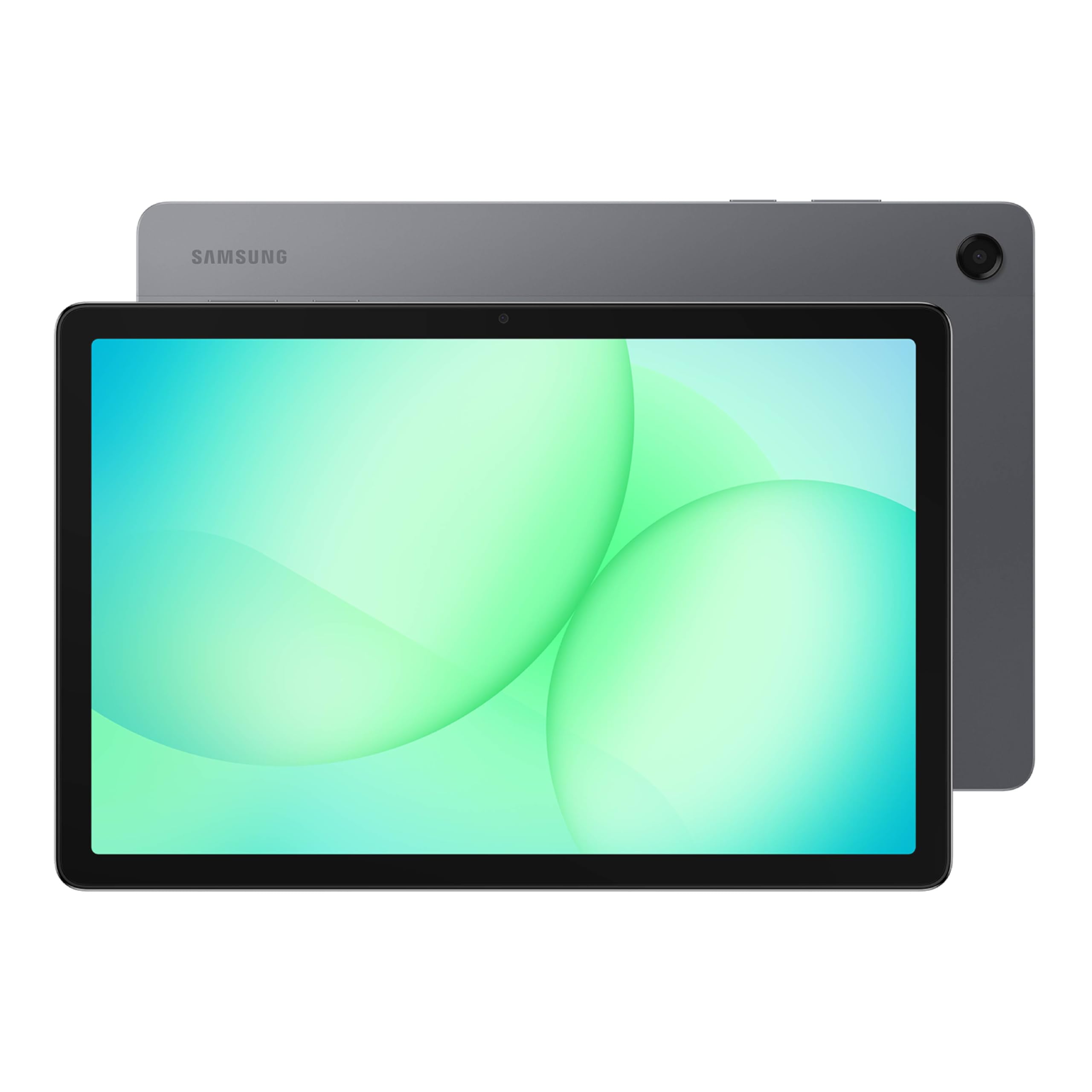
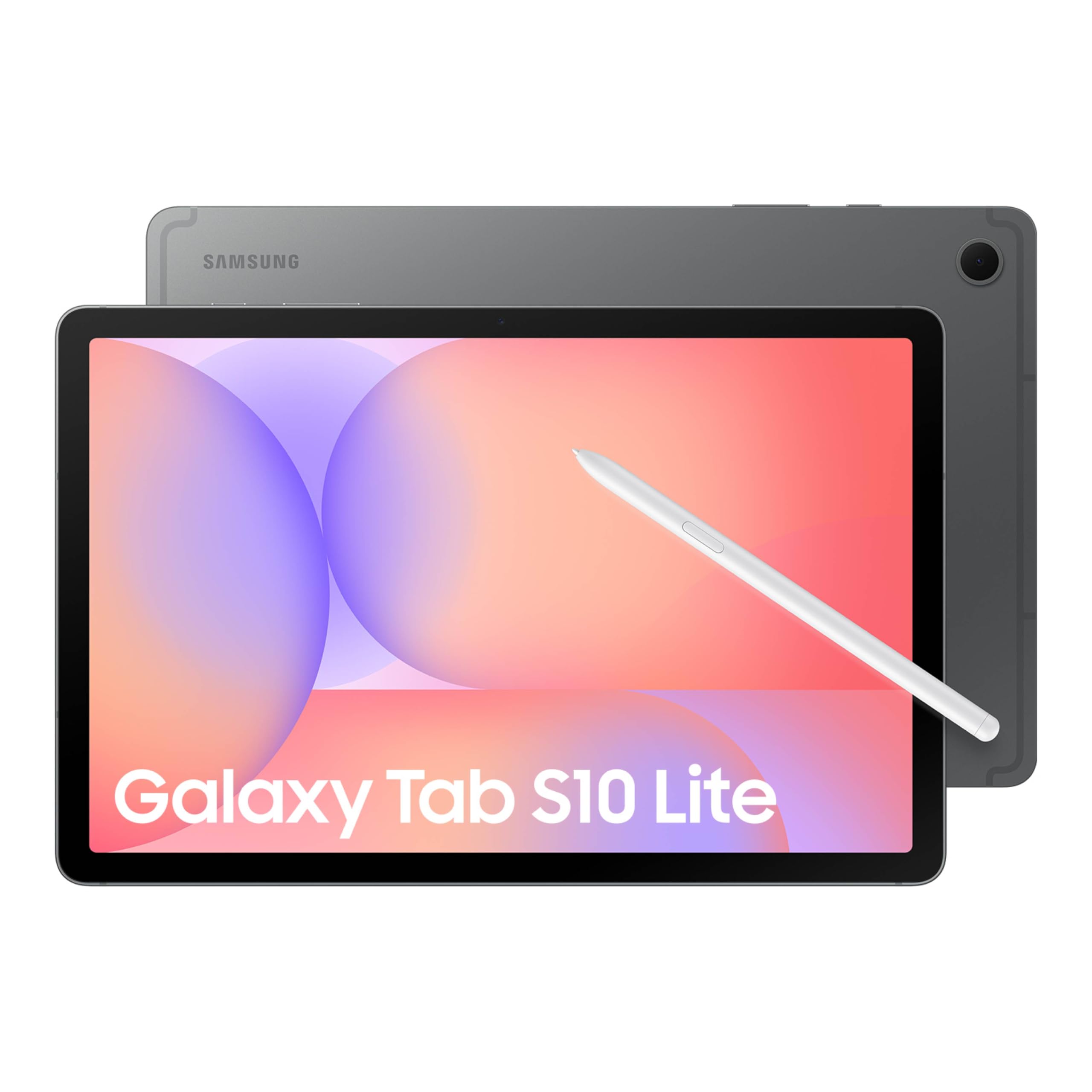
Product comparison
The two models
Product A
Galaxy Tab A11+
Best fit: Shared family entertainment
Why choose it: Straightforward Samsung media tablet
Main trade-off: No S Pen handwriting path
Last checked price
Price not verified
Product B
Galaxy Tab S10 Lite
Best fit: School notes and PDF markup
Why choose it: S Pen included in the box
Main trade-off: Higher tier unnecessary for streaming alone
Last checked price
$329.99
Paid link · PIQSY may earn a commission
Some shopping links may pay PIQSY a commission if you make a qualifying purchase. Editorial assessments remain independent. Affiliate disclosure
What matters when choosing
Quick answer: If you want a Samsung tablet for video, browsing and ordinary family use, start with the Galaxy Tab A11+. If you want to handwrite notes, annotate PDFs or draw with an S Pen, choose the Galaxy Tab S10 Lite, because it includes the pen and the A11+ does not support it. The exact US units here are both 6GB RAM, 128GB storage and Wi-Fi, making that input difference unusually easy to isolate.
The exact pair: Galaxy Tab A11+ Gray SM-X230NZAIXAR (6GB/128GB Wi-Fi) versus Galaxy Tab S10 Lite Coral Red SM-X400NZRAXAR (6GB/128GB Wi-Fi).
What you'll actually notice
For a family using a tablet to stream shows, open web pages, look at photos and make video calls, both models have a roughly 11-inch display and access to Android apps. The A11+ can cover those everyday jobs without the added emphasis on pen features.
For a student with a stack of digital readings, the difference is immediate. An included S Pen lets you circle diagrams, write in margins and navigate compatible note apps in a more natural way than tapping with a fingertip.
Samsung's US comparison explicitly labels the A11+ "Not compatible" with S Pen and the S10 Lite "Included." That is a clear functional dividing line. A separate stylus listing cannot make the A11+ support an input system its hardware doesn't support.
Both use TFT LCD screens according to Samsung's US comparison material. This isn't an automatic AMOLED-versus-LCD contest. The real buyer story is pen support, software needs and whether the Lite's additional features earn their cost.
What changes the choice
The handwriting hard gate is decisive
If your intended app requires proper Samsung S Pen input, the A11+ is not a fit. It's not a question of buying a better case later; Samsung documents that the device doesn't support the S Pen.
The S10 Lite's included pen makes the handwriting system clearer at checkout. That's particularly useful for students who annotate lecture material several times a week.
But don't buy the Lite for an imagined future art hobby if your tablet mainly plays video. A feature is valuable only when you use it.
The memory and storage starting points match
The two selected US variants have 6GB RAM and 128GB storage. That prevents a misleading comparison between, say, a higher-memory 256GB Samsung and the entry configuration of its rival.
The A11+ and S10 Lite use different chipsets, but these exact memory and storage baselines do not justify a blanket claim that one is measurably faster in all apps. We haven't independently established a common-method performance result here.
For basic media and reading, app compatibility and network quality may matter more than processor marketing. For a specific demanding app, check its technical requirements rather than assuming either model can run it without compromise.
Screen size is close, but not identical
Samsung lists an 11-inch display for the A11+ and 10.9-inch for the S10 Lite. In everyday terms, both are general-use tablet sizes. The screen difference on paper shouldn't drive the purchase unless you have a particular fit or accessory requirement.
If your tasks involve two full documents side by side, neither screen is especially spacious compared with 13-inch alternatives. If you hold the tablet often, both are more manageable than a giant Ultra.
Choose the size that works for your habits instead of attaching importance to a tenth of an inch that may not change your day.
The bundled pen changes the real cost
The S10 Lite includes the S Pen in its standard US package. The A11+ does not support the pen at all, so you cannot make it an equal handwriting setup by adding a Samsung stylus to your cart.
If you need a cover, Bluetooth keyboard or charger, add those separately for each model. The product page may display accessories that aren't part of the base retail box.
A11+ Kids Edition, unlocked 5G A11+, and other retailer bundles are separate SKUs. They must not be used as evidence of what's included with the standard Gray Wi-Fi device compared here.
The software ecosystem is similar—but not every capability
Both run Android and support compatible Google apps. That is useful for households already using Samsung phones and Android services. But some Samsung-exclusive or pen-driven functions depend on the hardware model.
Before buying for school, check the learning portal, notes app and exam platform. If the critical application runs only on Windows, neither Samsung tablet is a safe laptop replacement.
Also consider how long you'll use the device. Updating a compatible app and replacing a protective case can be more meaningful than chasing a spec in the wrong product category.
Avoid star-rating and battery shortcuts
Retailer star averages can pool reviews, incentives and variant families. They are not an independently deduplicated sample of US owners for these two exact SKUs. We won't turn that aggregate context into a verdict about reliability.
Likewise, Samsung's battery figures may use manufacturer conditions. Without a matched real-world test, there is no evidence here to claim one always lasts longer during school or streaming sessions.
For your budget, check current US prices and return terms. A lower headline price is useful only if the device meets the tasks you need.
The practical choice
Start with one simple question: Will you use an S Pen? If the answer is no, the A11+ is the simpler family-media proposition. If it's yes, the S10 Lite becomes the strong candidate because the compatible pen is actually part of the package.
This avoids turning a clear product decision into an overly technical chip comparison.
When to choose Galaxy Tab A11+
Choose it for movies, online shopping, browsing, family photos and occasional school tasks that do not require pen input. Check the exact Gray Wi-Fi 128GB part and any family-account requirements.
It's also reasonable when you'll mostly use a stand or touch controls and don't intend to pay for a creative accessory system.
When to choose Galaxy Tab S10 Lite
Choose the S10 Lite for handwritten class notes, PDF markup and casual drawing in compatible Android apps. Its included S Pen is a functional difference that you can use immediately.
Check that 128GB storage is enough for coursework and offline material, and confirm whether your preferred keyboard case is sold separately.
Choose neither when
If you need native Windows desktop software, neither tablet is sufficient. If you need a larger drawing canvas or a premium AMOLED display, compare a different Samsung tier. If you specifically need cellular data, neither Wi-Fi SKU meets that requirement; investigate exact US cellular versions.
PIQSY conclusion
The Galaxy Tab A11+ and S10 Lite are not merely two prices for the same Android tablet. The S Pen compatibility difference changes what you can do. Choose A11+ for uncomplicated everyday tasks; choose S10 Lite when handwriting is central.
Don't use a pooled star rating, an unknown battery winner or a storage-mismatched listing to overcomplicate that decision.
Before buying: Verify SM-X230NZAIXAR versus SM-X400NZRAXAR, the included S Pen, Wi-Fi storage tier, app requirements and current US checkout bundles.
Evidence notes — private only
- Samsung official exact A11+ Gray part: https://www.samsung.com/us/tablets/galaxy-tab-a11-plus/buy/galaxy-tab-a11-plus-128gb-gray-wi-fi-sku-sm-x230nzaixar/
- Samsung official S10 Lite and included S Pen: https://www.samsung.com/us/tablets/galaxy-tab-s10-lite/buy/
- Samsung US pen incompatibility comparison: https://www.samsung.com/us/tablets/galaxy-tab-a11-plus/
- No cross-variant reviews or quantified battery/performance comparison.
Final comparison
Which fits your priorities?
Product A
Galaxy Tab A11+
Choose when: Everyday video and browsing; a shared household tablet; someone who wants a Samsung device without paying for flagship extras.
Main advantage: A practical 11-inch Android experience without premium features you may not use.
Trade-off: Entry-level memory and display hardware, and no S Pen path for notes or drawing.
Read Verdict →Product B
Galaxy Tab S10 Lite
Choose when: Students who annotate class material; journalers and occasional artists; Android users who want a pen without a separate pen purchase.
Main advantage: The in-box S Pen makes the handwriting proposition clear from the outset.
Trade-off: You're choosing a practical midrange tablet, not Samsung's most powerful display or processor tier.
Read Verdict →Product details
Model details
See available model specifications
| Detail | Galaxy Tab A11+ | Galaxy Tab S10 Lite |
|---|---|---|
| US model | Galaxy Tab A11+ Gray | Galaxy Tab S10 Lite Coral Red |
| Brand | Samsung | Samsung |
| Model Name | A11+ | S10 Lite |
| Memory Storage Capacity | 128 GB | 128 GB |
| Screen Size | 11 inches | 10.9 inches |
| Display Resolution Maximum | 1920 X 1200 (WUXGA) pixels | 2112 x 1320 pixels |
| Generation | 7th Generation | 10th Generation |
| Model Year | 2026 | 2025 |
| Age Range Description | Adult | Adult |
| Included Components | Data Cable, Ejection Pin, Quick Start Guide | Data Cable, Ejection Pin, Quick Start Guide, S-Pen, Tab S10 Lite |
| Warranty Description | 1 Year Manufacturer | 2 Year Manufacturer |
| Model Number | SM-X238UZAAXAA | SM-X400NZANXAR |
| Specific Uses For Product | Personal | Entertainment, Kids, Student |
| UPC | 198957261039 198957260964 | 198957233845 |
| Number of Items | 1 | 1 |
| Style Name | Unlocked | S10 Lite |
| Manufacturer | Samsung | SAMSUNG |
| Number of Packs | 1 | Not recorded |
| Set Name | Samsung Galaxy Tab A11+ | Galaxy Tab S10 Lite |
| Item Highlight | Tablet with Upgraded Chipset, Long Battery Life, Quad Speakers, Multi Window Display, 2026 US Version, Gray, SM-X238UZAAXAA | Long Battery Life, S Pen for Note-Taking, Exynos 1380, Circle to Search, AI Tools |
| Configuration | 128GB | 6GB RAM, 128GB Storage |
| Unit Count | 1 Count | 1 Count |
| Size | 128GB | 128 GB |
| Model Series | Galaxy Tab A11+ | Galaxy Tab S10 Lite |
| Mfr Part Number | SM-X238UZAAXAA | SM-X400NZANXAR |
| Hardware Interface | USB 2.0 | USB |
| Wireless Technology | Bluetooth, Cellular, Wi-Fi | Wi-Fi |
| Cellular Technology | 5G | Not recorded |
| Total Usb Ports | 1 | Not recorded |
| Connectivity Technology | Bluetooth, Cellular, Wi-Fi | Wi-Fi |
| Wireless Provider | Unlocked for All Carriers | Not recorded |
| Wireless Compability | 802.11ac | 802.11ac, 802.11ax, 802.11g, 802.11n |
| Video Capture Resolution | HD 720p | FHD 1080p |
| Camera Description | Front, Rear | Rear |
| Rear Facing Camera Photo Sensor Resolution | 8 mp | 8 mp |
| Photo Sensor Resolution | 8 mp | Not recorded |
| Operating System | Android 16 | Android |
| Color | Gray | Gray |
| Video Processor | ARM | Mali G615 MC2 | ARM |
| Item Weight | 1.4 pounds | 1.2 pounds |
| Item Dimensions L x W x Thickness | 10.12"L x 6.64"W x 0.27"Th | 6.53"L x 10.01"W x 0.26"Th |
| Graphics Coprocessor | Mali-G615 MC2 | Not recorded |
| Human-Interface Input | Touchscreen with Stylus Support | Touchscreen with Stylus Support |
| Graphics Description | Integrated | Integrated |
| Compatible Devices | USB-C devices | Stylus |
| Warranty Type | Limited | Limited |
| Operating System Family | Android | Android |
| Software Update Supported to Date | unknown | unknown |
| Display Type | LCD | LCD |
| Native Resolution | 1920 x 1200 pixels | 2112 x 1320 pixels |
| Aspect Ratio | 16:10 | 16:9 |
| Display Refresh Rate in Hertz | 90 | 90 |
| RAM Memory Installed | 6 GB | 6 GB |
| RAM Size | 6 GB | 6 GB |
| Hard-Drive Size | 128 GB | 256 GB |
| Battery Capacity | 7040 milliamp_hours | 8000 milliamp_hours |
| Battery Cell Type | Lithium Ion | Lithium Polymer |
| Battery Power | 7040 milliamp_hours | 8000 milliamp_hours |
| Lithium-Battery Energy Content | 7040 milliampere_hour | 29.95 watt-hours |
| Processor Speed | 2.5 GHz | 2.4 GHz |
| Processor Description | MediaTek | MT8775 | Exynos 1380 |
| Processor Brand | Not recorded | Samsung |
| CPU Model Number | Not recorded | MediaTek Dimensity 9400+ | MT6991 |
| Other Special Features of the Product | Not recorded | Stylus Support |
| Flash Memory Supported Size Maximum | Not recorded | 2000 GB |
| Compatible Flash Memory Type | Not recorded | microSD |
| GTIN | Not recorded | 198957233845 |
Source: exact-US retained listing observations (latest checked 11/3/2026). Check current configuration with the manufacturer; these are not comparative performance tests.
Keep comparing
Related comparisons worth checking.
Galaxy Tab S10 Lite vs S10 FE: two pen tablets, one practical choice
Both the Galaxy Tab S10 Lite and Galaxy Tab S10 FE include an S Pen and offer a roughly 11-inch Android workspace. The Lite is the logical starting point for straightforward notes and school reading. Consider the FE if its 8GB RAM versus the selected Lite's 6GB, different processor or other exact features address a real need. These two US Wi-Fi models both have 128GB storage. A larger price tag is not a reason by itself.
Motorola moto pad 2026 vs Galaxy Tab A11+ 5G: carrier freedom can matter more than RAM
Choose the T-Mobile moto pad (2026) if your account and plan qualify and you specifically want a tablet connected to that carrier. Consider the unlocked Galaxy Tab A11+ 5G if carrier choice matters, after confirming support on your actual network. Both US models have 128GB storage, but Motorola's T-Mobile unit has 8GB RAM, while the Samsung selected 5G unit has 6GB. These figures don't establish a universal winner.
Our research approach
How to interpret the product details.
Our research approach
How to interpret the product details.