
PIQSY Compare
W2720i vs BenQ TK710
Movie Color or Gaming-First Laser? Movie night first?
The choice that matters
Movie Color or Gaming-First Laser?
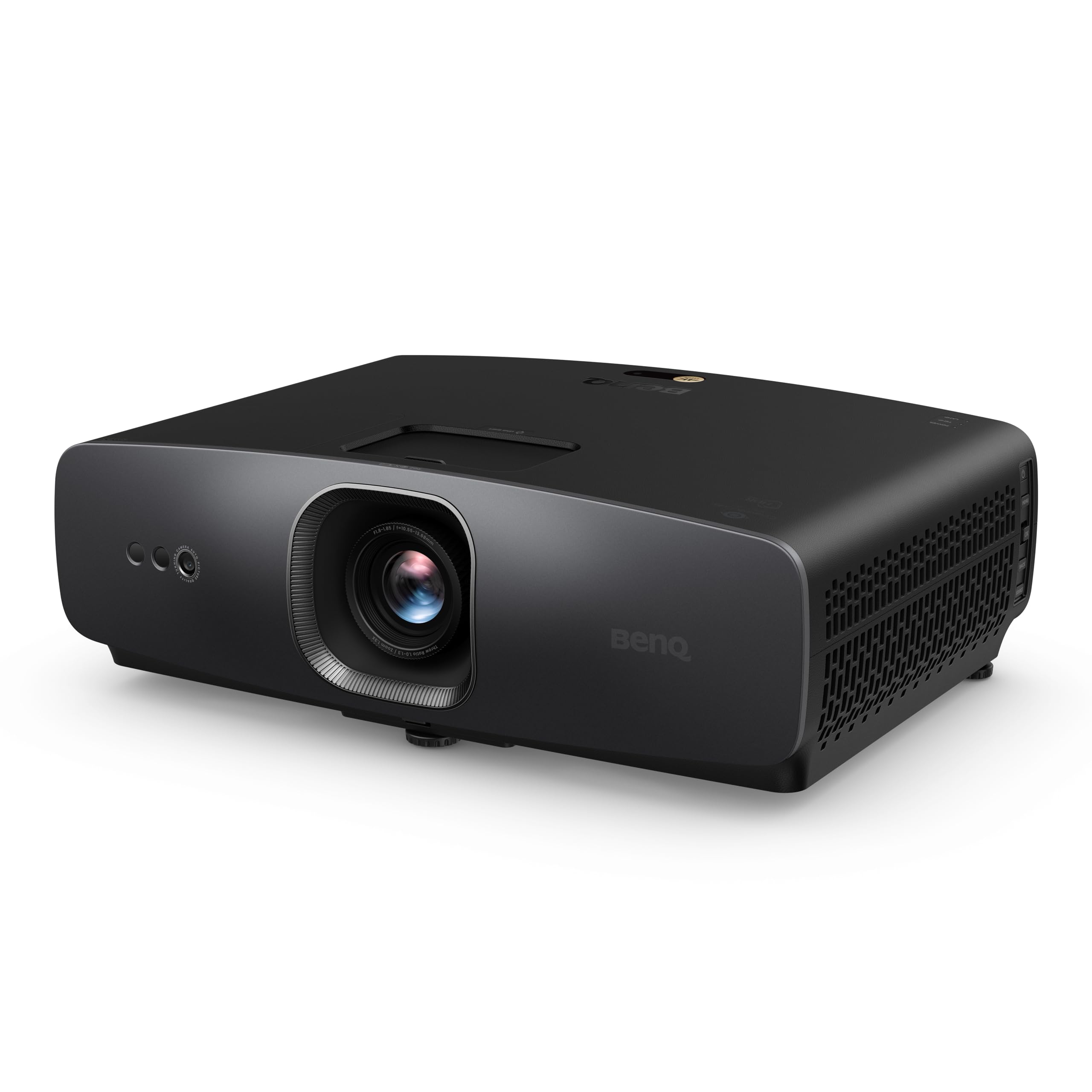

Product comparison
The two models
Product A
W2720i
Best fit: Light-controlled movie rooms
Why choose it: Cinema-oriented picture controls and 4LED light
Main trade-off: Less focused on high-refresh gaming modes
Last checked price
$1,459.99
Paid link · PIQSY may earn a commission
Product B
BenQ TK710
Best fit: Standard-throw high-refresh gamers
Why choose it: Laser source and documented lower-resolution speed modes
Main trade-off: Fastest modes require lower resolution
Last checked price
$1,799.00
Paid link · PIQSY may earn a commission
Some shopping links may pay PIQSY a commission if you make a qualifying purchase. Editorial assessments remain independent. Affiliate disclosure
What matters when choosing
Movie Color or Gaming-First Laser? Movie night first? The W2720i's cinema-focused 4LED design deserves a look. Play fast games regularly? The TK710's laser setup and high-refresh modes are worth comparing. Its higher manufacturer-rated ANSI brightness is context, not a measured picture-quality victory. Neither should win solely because one rated number looks larger.
The choice that matters
Choose the cinema-focused BenQ for movie-centered color and a tailored viewing room.
Choose the laser gaming BenQ for brighter-rated output and fast-play input modes.
At a glance
| What to consider | BenQ W2720i | BenQ TK710 |
|---|---|---|
| Light source | 4LED | Laser |
| Rated brightness | 2,500 ANSI lumens | 3,200 ANSI lumens |
| Lens throw | 1.0–1.3 | 1.15–1.5 |
| 4K60 manufacturer lag | 17.9ms | 16.7ms |
| High-refresh signal | 4K120 input becomes 1080p120 | 1080p120/240 modes |
| Optical positioning | ±5% vertical shift | Up to +10% vertical shift |
Cinema viewing or games: decide what fills your week
If a Friday night movie is the highlight of your week, the W2720i's cinema-focused 4LED design and BenQ's emphasis on color calibration deserve attention. If your evenings are more likely to involve a fast game, the laser-based TK710 has a different pitch: higher-refresh modes at lower resolution.
BenQ rates the TK710 at 3,200 ANSI lumens and the W2720i at 2,500 ANSI lumens. That's useful manufacturer context, not a matched movie-mode brightness test. Don't pay for the larger number assuming every scene will look brighter or more accurate. Ask yourself which activity takes priority—films in a dark room or responsive gaming—and judge the rest of the features against that answer.
Throw distance can decide before picture quality
Before falling for either light engine, measure the distance from the intended shelf or mount to the screen. The W2720i's 1.0–1.3 throw ratio means roughly 7.3–9.4 feet from lens to a 100-inch 16:9 picture (about 87 inches wide). The TK710's 1.15–1.5 ratio means around 8.4–10.9 feet. These are estimates from manufacturer optical specifications, not a promise that either mount will work.
An eight-foot shelf might be practical for the W2720i but awkward for the TK710 at that image size. The W2720i offers a modest ±5% vertical lens shift, while the TK710 has limited upward vertical adjustment. That's optical picture positioning, not a way to make the room deeper. Digital keystone can straighten an image but won't fix a lens that's too close or too far away.
Measure the lens position, screen height, clearance and cable route. A projector with perfect-looking specifications is still the wrong buy if you can't place it where the picture belongs.
The fastest gaming numbers aren't the same gaming mode
BenQ quotes 17.9ms input lag at 4K60 for the W2720i and 16.7ms for the TK710. The tiny difference between those manufacturer figures isn't a controlled PIQSY test or a reliable reason to crown a gaming winner.
The bigger distinction is what happens when you ask for more frames. The W2720i accepts a 4K120 signal but displays it at 1080p120 after downscaling. The TK710 advertises 1080p120 and 1080p240 modes, with its fastest 4.2ms claim applying to 1080p240—not 4K60.
For a story-heavy game at 4K60, you may care more about picture character and room fit. For regular fast PC gaming, those 1080p high-refresh options may be worth investigating. Check what your console or PC sends and which picture mode you need. Don't combine the best lag number and the best resolution into a gaming mode neither projector actually promises.
Maintenance, movies and smart use
Both the 4LED W2720i and laser TK710 avoid a conventional user-replaceable lamp. That can simplify ownership, but neither light source guarantees trouble-free electronics, quieter fans or a longer warranty. Think about where the projector will sit, how often you'll use it and whether you can reach it for cleaning or service.
Curtains are another practical consideration. The W2720i's movie-oriented settings make the most sense when you can control light, while the TK710 presents a higher manufacturer brightness rating for a wider range of entertainment. Neither will deliver rich dark scenes with sunlight hitting the screen.
Already own a streaming stick and soundbar? Then built-in entertainment features may hardly affect your choice. Otherwise check which accessories and apps actually come with the exact US seller's kit; don't assume a separate media player is included.
What the specifications cannot settle
These are manufacturer specifications, not a head-to-head movie or gaming test. A brightness maximum may be quoted in a different picture mode from the one you'll enjoy, and input-lag numbers apply only to their stated signals and settings. Light-source lifespan figures don't guarantee the rest of the projector will last equally long.
There aren't enough dependable exact-model US owner reviews here to compare long-term reliability. Current US seller prices, stock and package details also need checking. Decide first whether your room and viewing habits favor movies or fast gaming; compare current offers only after you've settled that.
Who should pick each projector?
Choose BenQ W2720i when: your main sessions are movies and series in a controlled-light room and the cinema lens fits your existing shelf or mount.
Choose BenQ TK710 when: you give more weight to high-refresh 1080p gaming, a laser engine and higher manufacturer-rated ANSI output, with sufficient lens distance.
Neither is the right choice when: your room is only five feet deep for a huge picture, or you need 4K at 120Hz without downscaling. A different lens class or display may be necessary.
Before making the purchase
Before buying, measure where the lens can sit and check the HDMI format your console or player really outputs. A projector with an impressive gaming mode won't help if you can't place it at the right distance. Confirm the included US accessories, software and warranty, then compare actual current prices rather than assuming a deal.
PIQSY conclusion
Choose the W2720i if the projector is mainly for movies in a dimmable room and its shorter throw and cinema-oriented settings fit your space. Choose the TK710 if faster 1080p gaming and the laser setup are more important—and you have enough distance for its lens.
If your favorite games are mostly 4K60 with occasional faster sessions, measure the room before letting a difference of a few advertised milliseconds make the decision. A projector you can't install isn't an upgrade.
Final comparison
Which fits your priorities?
Product A
W2720i
Choose when: A dedicated or light-controlled media room where film color, HDR setup and a planned screen position matter more than absolute gaming specifications.
Read Verdict →Product B
BenQ TK710
Choose when: Console or PC players who value a large image, a solid-state laser source and selectable gaming modes without moving to a short-throw installation.
Read Verdict →Product details
Model details
See available model specifications
| Detail | W2720i | BenQ TK710 |
|---|---|---|
| US model | W2720i | TK710 |
| Brand | BenQ | BenQ |
| Recommended Uses For Product | Home Cinema | Gaming |
| Special Feature | Built-In Speaker | Auto Focus, Built-In Speaker, Digital Keystone Correction, Short Throw, Wi-Fi Ready |
| Connectivity Technology | HDMI | HDMI |
| Display resolution | 3840 x 2160 | 3840 x 2160 |
| Additional Features | Built-In Speaker | Auto Focus, Built-In Speaker, Digital Keystone Correction, Short Throw, Wi-Fi Ready |
| Native Resolution | 3840 x 2160 | 3840 x 2160 |
| Display Resolution Maximum | 3840 x 2160 pixels | 3840 x 2160 pixels |
| Display Type | LED | Laser |
| Form Factor | Stationary | Desktop |
| Mounting Type | Tabletop Mount | Tabletop Mount |
| Brightness | 2500 lm | 3200 lm |
| Color | Black | Grey/White |
| Compatible Devices | Laptop, Speaker, Tablet, Television | Gaming Console |
| Contrast Ratio | 2,000,000:1 | 600,000:1 |
| Maximum Throw Distance | 25.1 feet | 16.3 feet |
| Light Source Operating Life | 30000 hours | 20000 hours |
| Maximum Image Size | 11.3 inches | 144 inches |
| Hardware Connectivity | HDMI | HDMI |
| Minimum Throw Distance | 3.3 feet | 8.4 feet |
| Minimum Image Size | 5.8 inches | Not recorded |
| Projector Maximum White Brightness | 2500 ansi_lumens | 3200 ansi_lumens |
| Picture Quality Enhancement Technology | AI Cinema Mode | HDR10, Dynamic Function |
| Antenna Location | Home Cinema | Gaming |
| Built-In Media | Power Cord | Adaptor |
| Model Name | Home Theater | TK Series |
| Model Number | W2720i | TK710 |
| UPC | 840046050887 | 840046050030 |
| Number of Items | 1 | 1 |
| Manufacturer | BenQ | BenQ |
| Item Highlight | 95% DCI-P3 Color, 2500 Lumens, HDR10/HLG, AI Cinema Mode, Android TV, Dolby Atmos Speaker, 3 yr warranty | 3200 Lms, 4ms Input Lag, 240Hz Refresh Rate, HDR10, eARC Support, Lens Shift, 1.3x Zoom, 240HZ Refresh Rate, 3 year warranty |
| Unit Count | 1 Count | Not recorded |
| Mfr Part Number | W2720i | TK710 |
| Warranty Description | 3 Year Manufacturer's Warranty | 3 Year Manufacturer |
| Item Weight | 21 pounds | 8 pounds |
| Software Update Supported to Date | unknown | unknown |
| GTIN | 840046050887 | 840046050030 |
| Wattage | Not recorded | 5 watts |
| Controller Type | Not recorded | Button Control |
| Control Method | Not recorded | Touch |
| Vertical Keystone Correction | Not recorded | 5.24 inches |
| Video Encoding | Not recorded | H.265 (HEVC) |
Source: exact-US retained listing observations (latest checked 11/3/2026). Check current configuration with the manufacturer; these are not comparative performance tests.
Keep comparing
Related comparisons worth checking.
Our research approach
How to interpret the product details.
Our research approach
How to interpret the product details.