
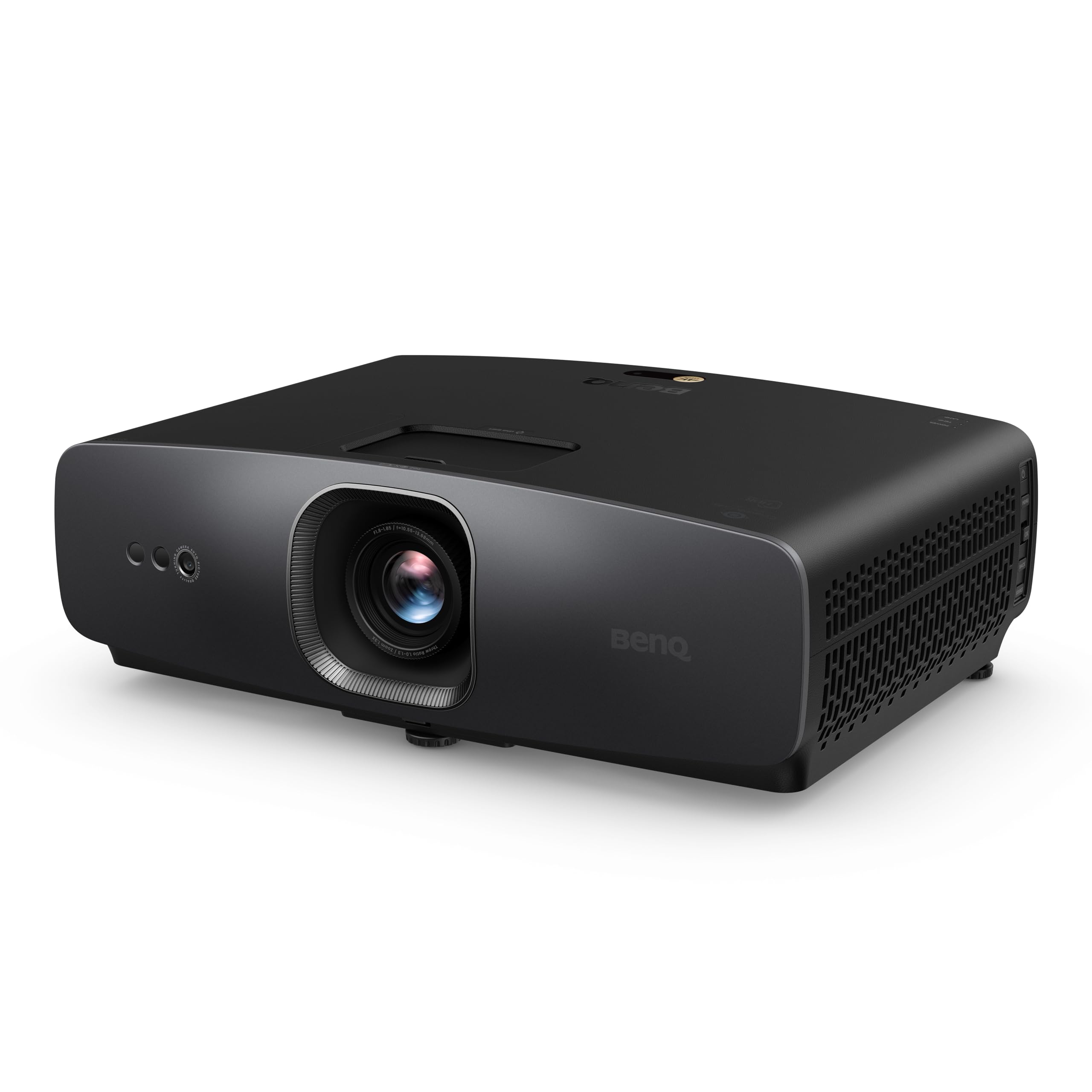
PIQSY verdict
W2720i
The W2720i is built around a planned movie room, not a projector that moves from surface to surface. Its cinema-oriented controls and 4LED setup are useful when you can darken the space and measure where the lens will sit.
US modelW2720i
Best fit
- Dedicated movie-room viewing
- Planned standard-throw setups
Skip if
- You need daytime TV brightness
- Your priority is native 4K120 gaming
Biggest reason to buy
Cinema-oriented picture controls and optical placement tools suit a planned movie screen.
Main compromise
The room must be dimmable and the projector positioned carefully; it is not a fast-gaming specialist.
Last checked price
$1,459.99
Amazon rating
★ 4.6 · 27 ratings
Amazon.com snapshot · Nov 3, 2026
Paid link · PIQSY may earn a commission
Some shopping links may pay PIQSY a commission if you make a qualifying purchase. Editorial assessments remain independent. Affiliate disclosure
What matters
Why it earns consideration — and why you might skip it.
Decision snapshot
Choose it for
A dedicated or light-controlled media room where film color, HDR setup and a planned screen position matter more than absolute gaming specifications.
Know before buying
Choose the Epson Home Cinema 3800 if optical installation flexibility and an established lamp-based 3LCD format fit your room better.
Quick verdict: Choose the BenQ W2720i if your priority is movie-centered viewing, you can control the room lighting, and you want a reasonably adaptable standard-throw setup. Its 4LED light engine, 4K UHD picture output, cinema-oriented picture modes and modest optical lens shift make more sense for a planned screen than for a projector that gets carried from room to room. Skip it if your main purchase goal is native 4K at 120Hz, a major lens-shift range or daytime TV replacement with the blinds open.
Best for: A dedicated or light-controlled media room where film color, HDR setup and a planned screen position matter more than absolute gaming specifications.
Think twice if: You need a projector to fit an unusually awkward mounting position, expect excellent blacks in a bright room, or primarily play fast competitive games at the highest console output.
Who it fits
If movie night usually happens in the same room, the W2720i deserves a look. It suits a screen you've already picked, a spot where the projector can stay put, and curtains that keep direct daylight off the picture. Measure before buying: this isn't the sort of projector you can place anywhere and expect the image to line up. In that setting, a projector designed around cinema-oriented picture controls has a clearer job than a model sold mainly on a headline brightness figure.
Its appeal is the combination of a 4LED source, BenQ's published 4K UHD output specification, dedicated cinema modes and optical adjustment. Those ingredients do not prove that it outperforms every competing projector. They do, however, explain why this model deserves consideration when your main question is how comfortably it fits a home-theater routine.
If your living room doubles as a sunny family space, the calculation changes. Even a projector with a respectable rated output loses perceived contrast when ambient light hits the screen. You may get more daily value from improving window coverings or choosing a more light-tolerant display than from chasing a projector's advertised lumen number.
What changes the decision
Your room matters more than its brightness headline
BenQ publishes 2,500 ANSI lumens for the W2720i. That is a manufacturer rating, not a PIQSY bench measurement and not a promise that the most color-faithful picture mode will deliver the same output. Bright and cinema-oriented modes can have different priorities. A buyer choosing primarily for movies should pay attention to how much light remains in the mode they actually intend to use.
Do not treat that ANSI figure as directly comparable with Epson's separate color-light and white-light ratings, or with another brand's ISO-lumen specification. Different protocols describe different things. What matters on your wall is image size, screen gain, room illumination and the settings you can tolerate. The larger the image, the more light is spread over it. A well-controlled 100-inch setup can make a different impression from a much larger screen under the same lighting.
Picture your usual 7 p.m. movie night, not the perfectly dark room in a product demonstration. If the curtains stay open and lamps stay on, this isn't the projector to pick just because its brightness number looks reassuring. Decide how much light you can realistically control before choosing the screen size.
The lens gives you room to plan, not permission to guess
The published 1.0–1.3 throw-ratio range is useful because it determines how far the lens needs to sit from the image. For a 100-inch 16:9 picture, the approximate image width is 87 inches; using BenQ's stated ratio, the lens distance works out to roughly 7.3–9.4 feet before accounting for the precise screen and installation geometry. Measure from the lens, not from the back edge of the cabinet.
The lens can move the picture slightly up or down without digitally reshaping it, which helps if your shelf or mount is just a little off. But the optical vertical lens-shift range is only ±5%. If the projector sits far above or below the screen, that small adjustment won't rescue the installation. Keystone correction is a different tool: it digitally reshapes the image and is best treated as a convenience rather than your installation plan.
If you're renting, using an existing ceiling bracket or working around a low beam, draw the proposed screen rectangle first. Then confirm the manufacturer's calculator against the actual mounting point. A projector with much more generous lens shift may ultimately be the less frustrating purchase even if you prefer the W2720i's cinema focus.
4K input does not mean every high-refresh mode stays 4K
This is the most important gaming distinction. BenQ lists 17.9ms input lag for 4K at 60Hz, as a manufacturer-published mode-specific figure. Its HDMI specification also describes accepting a 4K 120Hz input on one connection while downscaling it to 1080p at 120Hz. That is not native 4K 120Hz display output. The higher-refresh option changes the resolution trade-off.
For cinematic single-player games, 4K60 with a reasonably responsive mode may be a comfortable compromise. For players who want high refresh with minimal delay above all else, a gaming-first projector or gaming monitor deserves attention. An independent review mentioning roughly 19ms in a Fast mode does not create a universal measured response time; mode, signal and testing method need to remain attached to that figure.
Also distinguish input lag from motion clarity. Response behavior, image processing and refresh settings affect what playing feels like, and none can be inferred reliably from the 4K label alone.
4LED convenience is not a contrast guarantee
The 4LED light source avoids the conventional replacement-lamp ownership rhythm. BenQ publishes long source-life figures, but rated source life is not a guarantee of unchanged brightness for every hour of use. Light-source type also tells you little by itself about dark-scene contrast in your specific room.
Look instead at how your favorite films are lit. If you watch many dark movies, room reflections, screen choice and black-floor performance may matter more than a colorful demonstration image. Manufacturer contrast ratios with dynamic light-source dimming should not be treated as directly comparable measured native contrast values.
The W2720i includes a range of cinema and HDR picture choices. That flexibility is valuable only if you will actually set them up. Buyers who never want to touch a picture menu may prefer a simpler living-room product.
Owner feedback
Owner feedback for the exact US W2720i is still too limited to make a confident call on long-term noise, picture consistency or setup frustrations. A retailer's star average doesn't settle those questions. Check the seller's return policy and look for experiences with this precise model.
Owner views
Owner feedback still developing
Owner feedback is still developing, so PIQSY is not presenting a consensus yet.
Who should choose something else
Choose the Epson Home Cinema 3800 if optical installation flexibility and an established lamp-based 3LCD format fit your room better. Its throw options and lens adjustment are a different proposition, although its 4K PRO-UHD processing should not be mistaken for native 4K LCD panels. The decision here is setup and light-engine preference, not an unsupported claim that one always produces the prettier picture.
Choose the BenQ TK710 if you prioritize a laser light source and mode-specific high-refresh gaming over a cinema-first personality. The TK710's standard throw still requires measurements, and its fastest published lag figure applies to 1080p at 240Hz, not 4K at 60Hz. It is not a free upgrade on every dimension.
If your biggest limitation is daylight, consider a high-brightness-oriented setup only after planning ambient-light control, screen placement and a realistic image size. A short-throw or ultra-short-throw design may better suit a room with little rear depth; the W2720i is not a substitute for those installation classes.
Practical buying checklist
Measure screen width and lens-to-screen distance, allow room for ventilation, and decide how you will route HDMI and audio before ordering. Confirm the exact US model, included streaming accessory, power cord, warranty and seller condition for the offer in front of you; don't infer the contents of a particular retailer box from a family name. If you're using a receiver, verify the intended audio return and switching route.
Do one final test of your priorities: Would you still select this projector if you had to run your games at 4K60 rather than 4K120? And could you still enjoy movies if the room needed curtains? If the answer to both is yes, its trade-offs are probably aligned with your routine.
PIQSY conclusion
The BenQ W2720i belongs on a movie-first shortlist for a measured, reasonably light-controlled installation. Its strongest case is not that a 2,500-ANSI-lumen label settles the argument. It is that its optical geometry, 4LED source and cinema-oriented options suit a buyer who knows where the screen will go and values the viewing experience over the highest-refresh specification. Buy on that basis; skip it if your actual room or gaming habits demand something else.
Before purchasing: Check the exact US package and current seller offer. We haven't verified today's US price, seller condition or a dependable exact-model owner rating.
Technical detail
Specifications
See full specifications
| Product | W2720i |
|---|---|
| US model | W2720i |
| Brand | BenQ |
| Recommended Uses For Product | Home Cinema |
| Special Feature | Built-In Speaker |
| Connectivity Technology | HDMI |
| Display resolution | 3840 x 2160 |
| Additional Features | Built-In Speaker |
| Native Resolution | 3840 x 2160 |
| Display Resolution Maximum | 3840 x 2160 pixels |
| Display Type | LED |
| Form Factor | Stationary |
| Mounting Type | Tabletop Mount |
| Brightness | 2500 lm |
| Color | Black |
| Compatible Devices | Laptop, Speaker, Tablet, Television |
| Contrast Ratio | 2,000,000:1 |
| Maximum Throw Distance | 25.1 feet |
| Light Source Operating Life | 30000 hours |
| Maximum Image Size | 11.3 inches |
| Hardware Connectivity | HDMI |
| Minimum Throw Distance | 3.3 feet |
| Minimum Image Size | 5.8 inches |
| Projector Maximum White Brightness | 2500 ansi_lumens |
| Picture Quality Enhancement Technology | AI Cinema Mode |
| Antenna Location | Home Cinema |
| Built-In Media | Power Cord |
| Model Name | Home Theater |
| Model Number | W2720i |
| UPC | 840046050887 |
| Number of Items | 1 |
| Manufacturer | BenQ |
| Item Highlight | 95% DCI-P3 Color, 2500 Lumens, HDR10/HLG, AI Cinema Mode, Android TV, Dolby Atmos Speaker, 3 yr warranty |
| Unit Count | 1 Count |
| Mfr Part Number | W2720i |
| Warranty Description | 3 Year Manufacturer's Warranty |
| Item Weight | 21 pounds |
| Software Update Supported to Date | unknown |
| GTIN | 840046050887 |
Amazon.com technical listing observed Nov 3, 2026. Confirm exact configuration with the manufacturer.
Final decision
Ready to choose, or want one more check?
Buying options
Check the current offer.
Amazon.com · Checked Nov 3, 2026
Paid link · PIQSY may earn a commission
Our research approach
How to interpret the product details.
Our research approach
How to interpret the product details.